The cost argument for offshore staffing is settled. In-house agents cost between $42 and $50 per hour, fully loaded. Managed offshore BPO programs cost $12–$18 per hour for the same work. Operations leaders across industries have done the math.
The remaining objection is not about cost. It is about visibility.
A February 2025 SHRM analysis found that 23.7% of U.S. workers now work remotely, at least part of the time. That is up from 17.9% in 2022. As remote and offshore work has grown, one question keeps coming up: “How do I know they’re actually working?”
Desktop monitoring is built to answer that question. It gives you the same visibility a floor supervisor has, just done digitally. If you are still deciding whether offshore staffing is right for your operation, start there first. This guide covers what to do once your offshore team is in place and how to stay visible across time zones.


What Is Desktop Monitoring for Remote Teams?
Desktop monitoring records what an agent does on their computer during work hours. It captures their screen, the apps they use, how long they are active, and when they go idle. Supervisors and clients can view this data through a live dashboard or pull recordings on demand.
In a managed offshore call center, desktop monitoring does three things:
- Productivity tracking. It tracks active and idle time every shift. You can see exactly when agents were working and when they were not.
- Process compliance. It checks that agents follow the right steps: using the CRM correctly, applying the right dispositions, and staying in approved apps during calls.
- Data security. It confirms that agents can access client data only within their assigned role. Unauthorized file exports or screenshots are flagged right away.
Desktop monitoring is not a spy tool. It is not meant to catch small mistakes. Think of it as the digital version of an open office floor. Agents know monitoring is on. That alone helps keep everyone accountable.
What Desktop Monitoring Actually Captures: The Specific Data Points
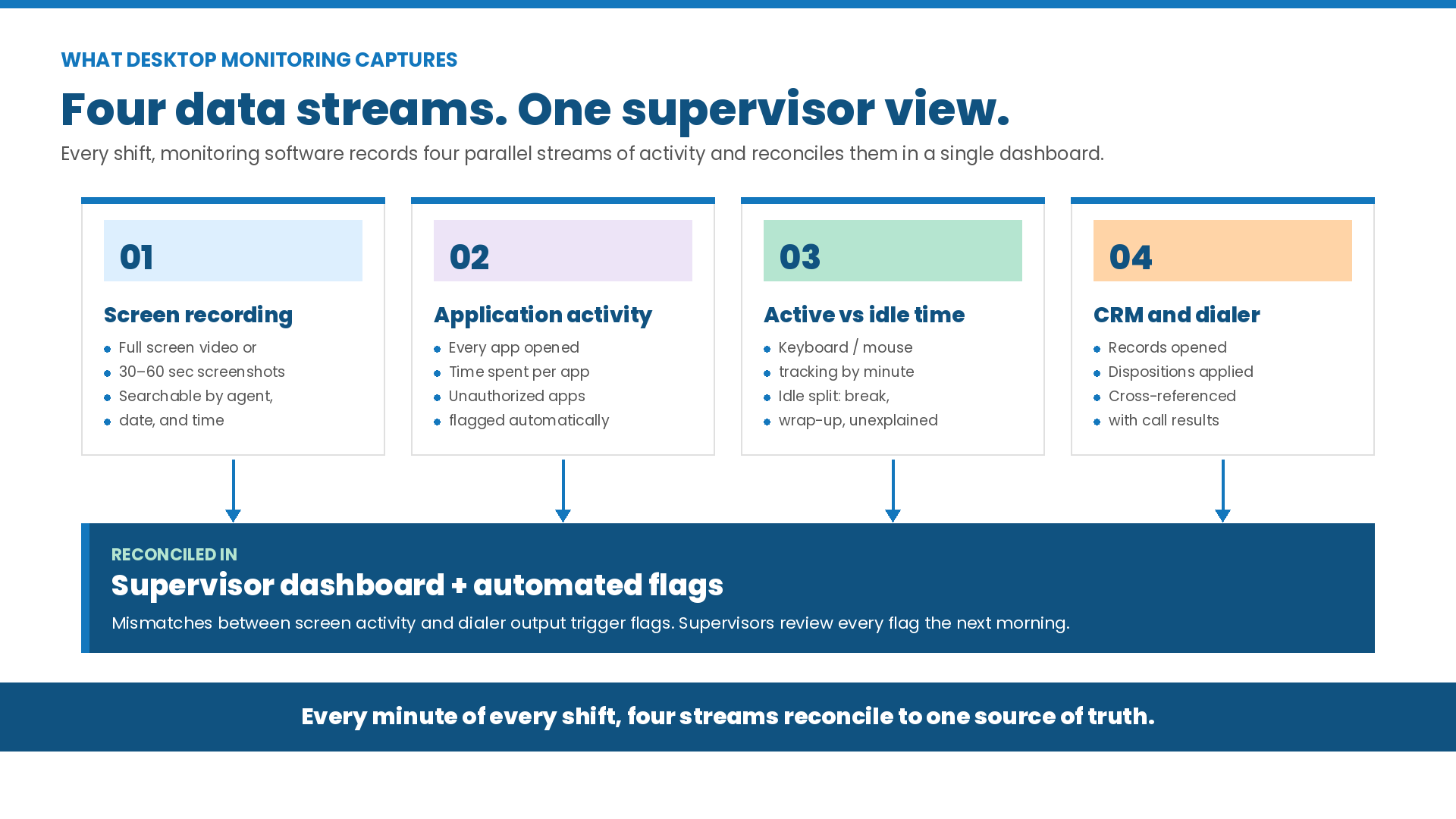
When evaluating an offshore vendor, do not just ask whether they have monitoring software. Ask what it actually records. Here is what most enterprise monitoring platforms capture.
Screen Recording and Screenshot Logs
The system records the agent’s full screen during their shift. Every window and page they visit is saved. You can search recordings by agent name, date, or time.
Some vendors use screenshots instead of a full video. The system takes a still image every 30 to 60 seconds and saves it with a timestamp. This works well for daily reviews and uses less storage.
Application and Window Activity Logs
Every app an agent opens is logged with a timestamp and time spent. A typical log shows:
- Time inside the CRM platform
- Time in the dialer interface
- Time in the script reference document
- Time in any app outside the approved workflow
Any unauthorized app (like personal email or social media) is flagged right away. Supervisors review these flags each morning.
Active vs. Idle Time Breakdown
The system separates active time (keyboard or mouse movement) from idle time (no movement). Idle time is split into three types:
- Authorized idle: logged break periods
- Post-call wrap-up: approved time between dispositions
- Unexplained inactivity: idle time during work hours with no break logged
This is the most useful metric desktop monitoring produces. It tells a supervisor not just that an agent was logged in for eight hours, but they were active for 6.4 of those hours. The remaining 1.6 hours of idle time are tagged with exact timestamps.
CRM and Dialer Activity Cross-Reference
The system also tracks what agents do inside the CRM and dialer. It logs records opened, dispositions applied, transfers started, and time in each call stage. This data is matched against the dialer’s output. If the screen data does not match the logged call results, it is flagged. For teams using Five9, the Five9 configuration checklist shows what to verify on the dialer side.
How Desktop Monitoring Data Is Used Day-to-Day
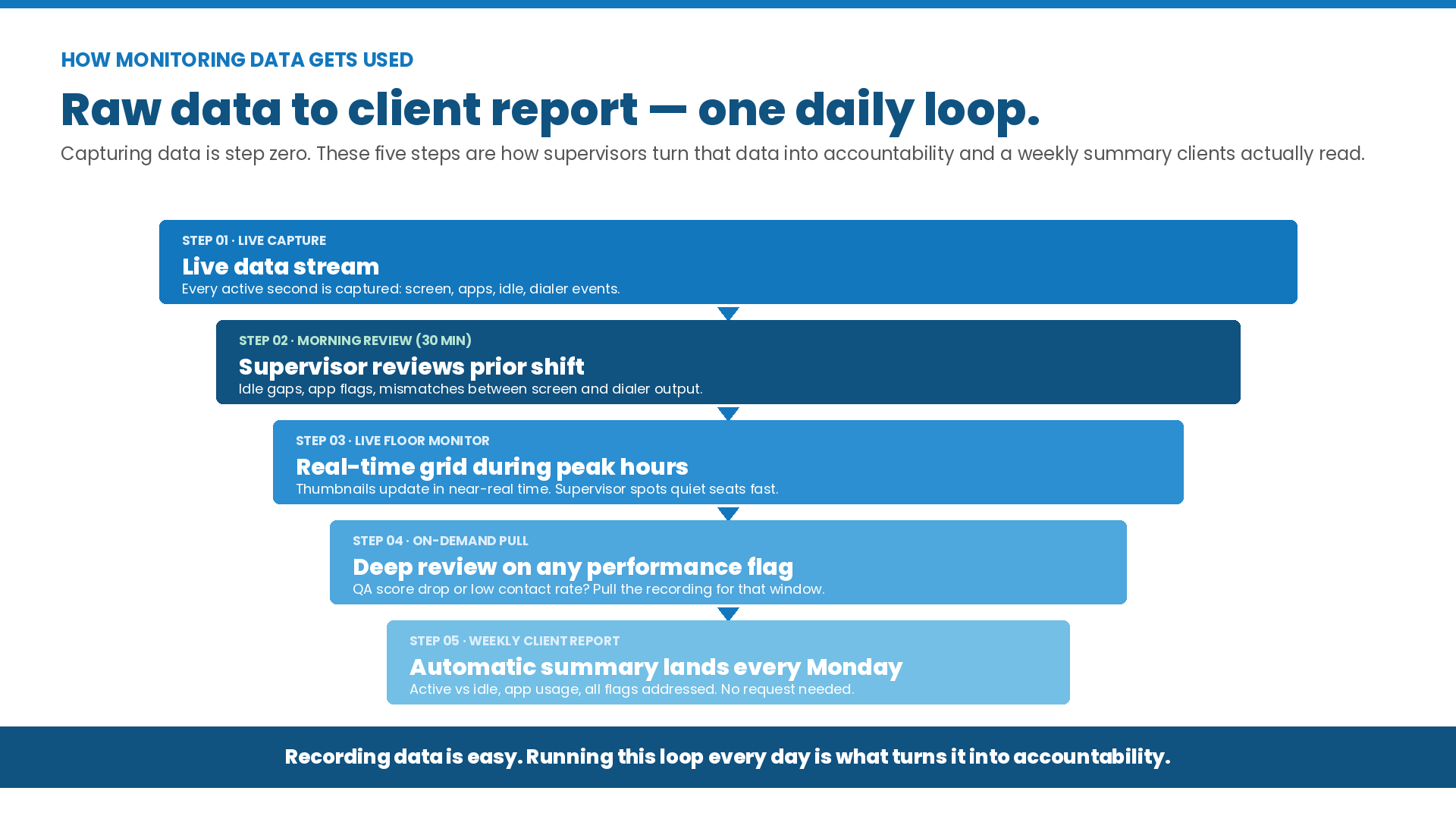
Data alone is not enough. Supervisors need to know how to use it. In a well-run offshore operation, this is the standard daily process.
Morning Productivity Review
In the first 30 minutes of each shift, supervisors review the prior day’s data. They check idle time, app usage, and any gaps between screen activity and dialer output. Agents with unusual patterns get a short coaching chat before calling starts. For sales-floor campaigns, supervisors also check flagged agents against call center sales pipeline management benchmarks.
Real-Time Floor Monitoring During Peak Hours
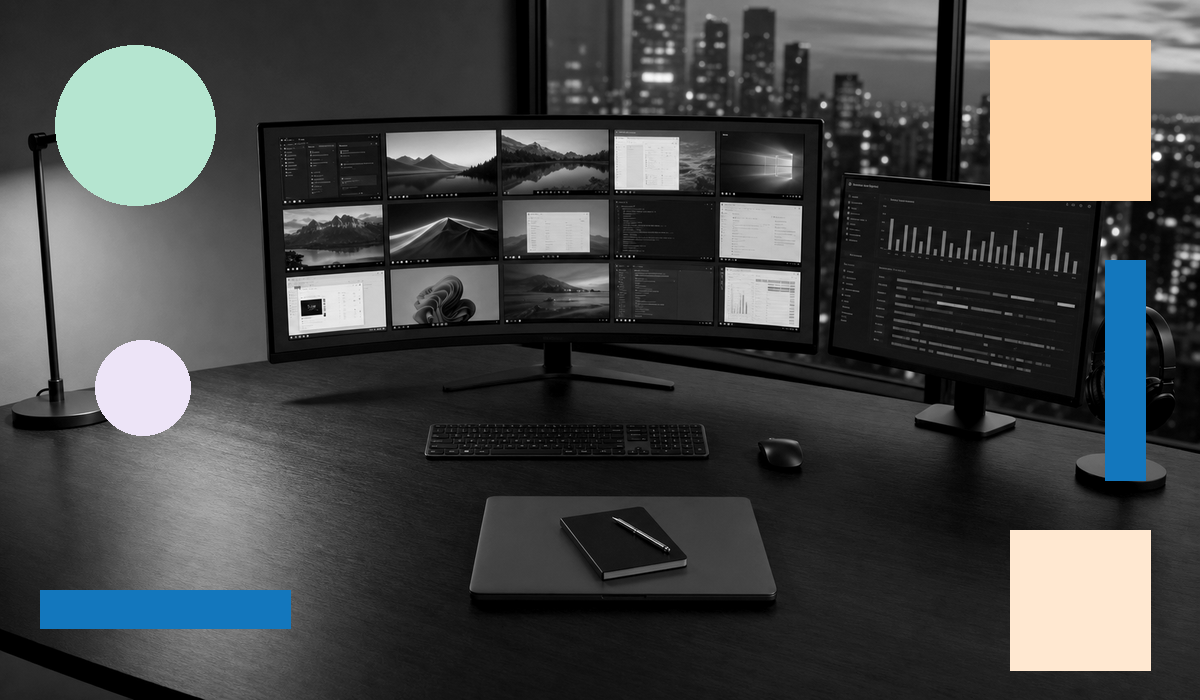
During peak hours, the supervisor sees a live grid of every agent’s screen. Thumbnails update in near-real time. If an agent stays on a single CRM record for too long, opens a non-work app, or goes quiet without logging a break, the supervisor spots it right away.
On-Demand Deep Review for Performance Issues
When a performance issue comes up (low contact rate, a QA flag, or a disposition error), the supervisor pulls the recording for that time period. The data is tied to specific on-screen behavior. That turns a number into a real coaching conversation with clear evidence.
Weekly Productivity Reporting to Clients
Each week, clients receive a summary report. It covers active vs. idle time by agent, app usage, and a log of flags addressed. You do not have to ask for it. It arrives automatically.
What Desktop Monitoring Does Not Replace
Desktop monitoring shows what agents are doing on their screens. It does not tell you if they are doing it correctly.
Call Quality Assessment
Screen recordings do not show how an agent handled a call. You cannot see if they followed the script, managed objections well, or transferred correctly. That requires call recording and QA scoring. AI-assisted QA can cover 100% of calls without adding headcount. Desktop monitoring and call QA work together. Neither replaces the other.
Performance Root Cause Analysis
High idle time is a symptom, not a diagnosis. The cause could be CRM confusion, burnout, poor training, or deliberate underperformance. Finding out which one requires a real conversation. The data surfaces the problem. The supervisor solves it.
Work Output Quality Verification
For virtual staffing roles (data entry, content scheduling, research), desktop monitoring shows the agent was in the right apps for the right amount of time. It does not check if the work was done correctly. That requires a separate output review. For more on what a managed virtual staffing engagement includes, see virtual staffing services.
For a full look at how QA is structured in a managed call center, see call center quality assurance best practices.
5 Questions to Ask Any Offshore BPO Vendor About Their Desktop Monitoring
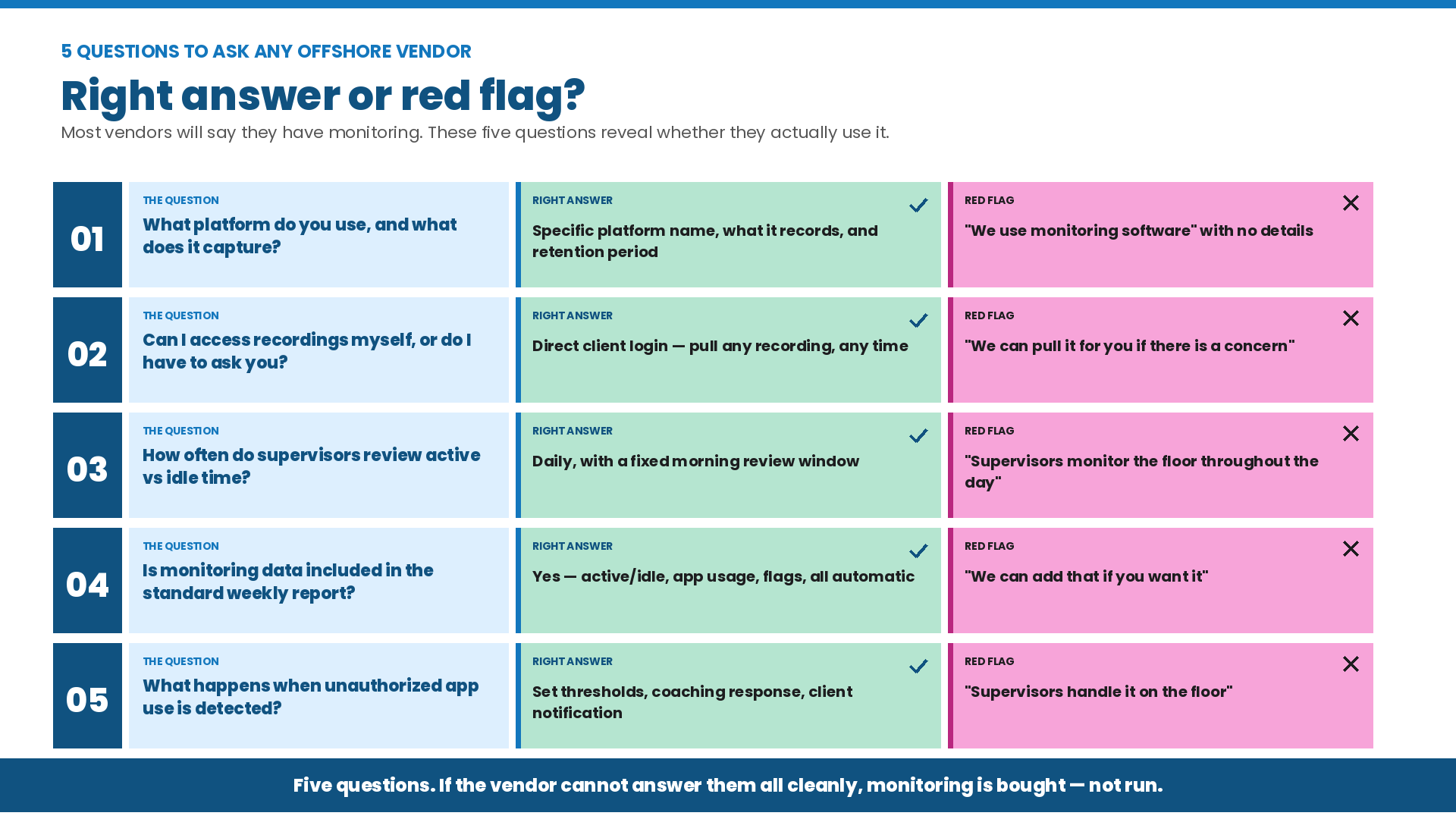
Most offshore vendors will say they have monitoring in place. These five questions will tell you if they actually use it, or own the software.
Question 1: What platform do you use, and what does it capture?
- Right answer: A specific platform name, a clear description of what it captures, and how long recordings are stored.
- Wrong answer: “We use monitoring software” with no details.
Question 2: Can I access recordings myself, or do I have to ask you?
- Right answer: Direct access: you can pull any recording at any time without going through the vendor.
- Wrong answer: “We can pull recordings for you if there is a concern.”
Question 3: How often do supervisors review active vs. idle time?
- Right answer: Daily, with a specific review time in the morning.
- Wrong answer: “Supervisors monitor the floor throughout the day.”
Question 4: Is monitoring data included in the standard weekly report?
- Right answer: Yes. Active/idle time, app usage, and flagged actions are included automatically.
- Wrong answer: “We can add that if you want it.”
Question 5: What happens when unexplained idle time or unauthorized app use is detected?
- Right answer: A clear process with set thresholds, a coaching response, and a client notification step.
- Wrong answer: “Supervisors handle it on the floor.”
Desktop Monitoring and Employee Privacy: What Offshore Operations Must Consider
Desktop monitoring is governed by the laws of the country where agents work, not U.S. law. This matters.
The Philippines is the top market for U.S.-facing offshore call centers. The National Privacy Commission there allows employee monitoring under NPC PHE Bulletin No. 14. Employers can monitor work devices during work hours. The monitoring must be disclosed, proportionate to the business need, and compliant with the Data Privacy Act of 2012. Agents are told at onboarding that monitoring is active. This is standard practice across the Philippine call center sector.
The Philippine IT-BPM industry closed 2025 with over $40 billion in export revenues and a workforce of 1.9 million workers, according to IBPAP. The industry is projected to reach $42 billion in revenue in 2026.
The rule is proportionality. Tracking idle time and app usage for work is acceptable and widely used. Monitoring personal devices or personal messages outside work hours is not permitted and is not covered by the DPA.
Before signing with any offshore vendor, ask for their written monitoring policy. It should cover scope, retention, access controls, and permitted uses. A vendor without one has not thought this through.