Every dialer vendor has the same pitch. The predictive company says predictive gets the most talk time. The power dialer company says power removes compliance risk. The preview company says preview leads to better calls.
All three are right, about their own mode, for the right floor.
This is not a software choice. It is a floor design choice. The right mode depends on four factors: agent count, lead type, compliance needs, and whether the floor prioritizes call volume or call quality.
Pick the wrong mode and the problems stack up fast. Predictive with too few agents creates compliance risk. Previewing a high-volume list wastes agent time. Powering on a large internet lead campaign leaves contact rate on the table.
The FTC’s 2024 updates to the Telemarketing Sales Rule added new compliance rules for outbound calling. Those rules took effect in late 2024. Enforcement has ramped up through 2025 and 2026. More floors use auto-dialers every quarter. The mode choice matters more now than ever.
This guide covers each mode, the compliance rules that most vendors skip, and a framework for matching the right mode to any floor. For teams still building the full campaign setup, the outbound dialing campaign guide walks through the process from list prep to live dialing.


What Each Dialing Mode Actually Does: Precise Definitions
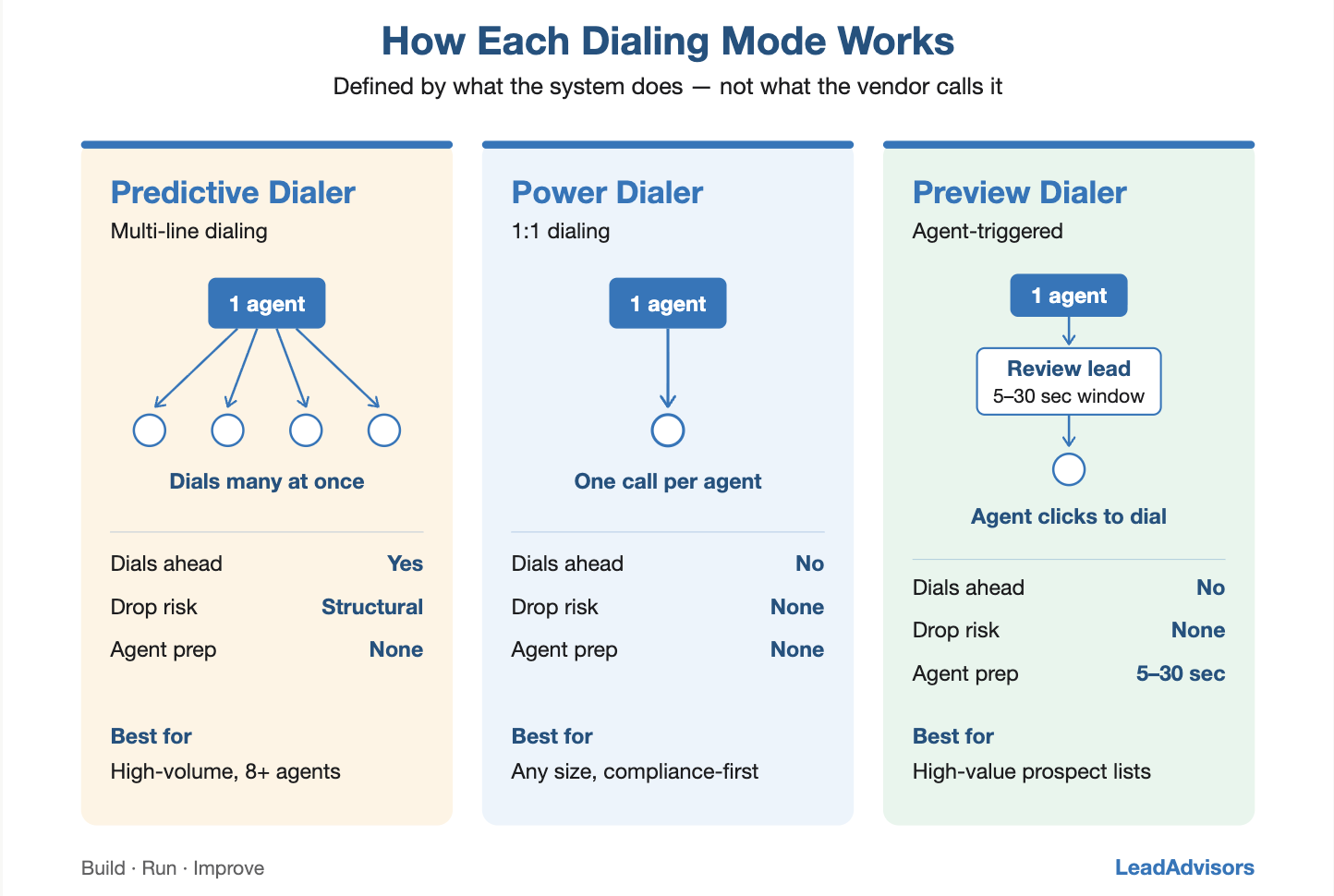
Vendors use these terms loosely. A different name may call the same mode on a different platform. The definitions below are based on what the system does, not what the vendor calls it.
What Is a Predictive Dialer?
A predictive dialer dials many numbers at once for each free agent. An algorithm decides how many to dial. It looks at answer rates, call length, and the number of agents available. When a real person answers, the call is routed to the next available agent. If no agent is free, the call is dropped or sent to a recorded message.
The key trait: calls go out before an agent is free. The system guesses that an agent will open up by the time someone answers. That guess is never perfect. That is why dropped calls happen.
As stated in the FTC’s official Telemarketing Sales Rule compliance guide, predictive dialers “promote telemarketers’ efficiency by simultaneously calling multiple consumers for every available sales representative.” The trade-off is that “some calls are abandoned: consumers are either hung up on or kept waiting for long periods.”
What Is a Power Dialer?
A power dialer dials one number per free agent. When an agent ends a call, the next call fires right away. No manual dialing is needed. Unlike predictive, the system waits for the agent to be free first. It never dials more than one line per agent.
The key trait: one call per agent at all times. No dropped calls from the dialer itself. It is slower than predictive, but there is zero risk of abandoned calls.
What Is a Preview Dialer?
A preview dialer shows the lead record to the agent before the call goes out. The agent gets a short window (usually 5 to 30 seconds) to read the prospect’s info. Then the agent clicks to connect. The call does not start until the agent acts. Some systems let the agent skip a record. Others require the call.
The key trait: the agent reviews before dialing. It is the slowest of the three modes. But it gives the highest call quality. It works best for high-value lists where prep time before the call makes a real difference.
| Feature | Predictive | Power | Preview |
| Dials ahead of the agent? | Yes (multi-line) | No (1:1 ratio) | No (agent-triggered) |
| Abandoned call risk? | Yes, structural | None | None |
| Agent prep time? | None | None | 5–30 seconds |
| Best for | High-volume, 8+ agents | Any size, compliance-first | High-value prospect lists |
The Compliance Dimension: What Every Floor Must Know Before Choosing Predictive
The FTC’s Telemarketing Sales Rule (TSR) imposes strict requirements on dropped calls. It only applies to predictive dialing. It is the biggest factor in the predictive vs. power choice for any floor with shifting agent counts or hard-to-predict answer rates.
The 3% Abandoned Call Rule
The TSR states that any floor using a predictive dialer must keep its dropped-call rate below 3%. This is measured over any 30-day window. A dropped call means a real person picked up but was not linked to a live agent within two seconds.
The FTC’s official guide lists five safe harbor rules:
- The dropped call rate must stay at or below 3% of calls picked up by a live person
- A live agent must connect within 2 seconds of the person picking up
- Calls must ring for at least 15 seconds or 4 rings before being cut off
- A recorded message with the company name and callback number must play when no agent is free
- Records that prove compliance must be kept on file
A November 2025 report by the ECAC found that the FCC has asked for public input on dropping or changing the 3% cap. The question is whether rules built for older dialing tech still make sense with modern systems. But until a change is made, the 30-day rolling cap is still the law.
Why This Matters on the Floor
Predictive dialers aim to increase talk time by placing calls before an agent is available. The faster they dial, the more talk time they get, but the more dropped calls they have. The system is always trying to balance these two things.
That balance depends on agent count. With 15 or more agents, the system has enough data to make good guesses. The dropped-call rate remains in check. With 5 to 7 agents, the length of each call skews the math too much. The system’s guesses get worse. Dropped call rates jump without warning.
The Practical Threshold
Most dialing pros say 8 to 10 agents is the floor for a stable predictive setup. Below that, power dialing is safer and often just as fast.
This rule does not show up in most vendor pitches. Vendors want to sell predictive mode regardless of floor size. But the compliance risk is real for any floor running predictive with fewer than 8 agents.
Throughput Comparison: What Each Mode Produces Per Agent Hour
Dials per agent hour is the number most floor owners look at first. Here is what each mode produces based on industry benchmarks:
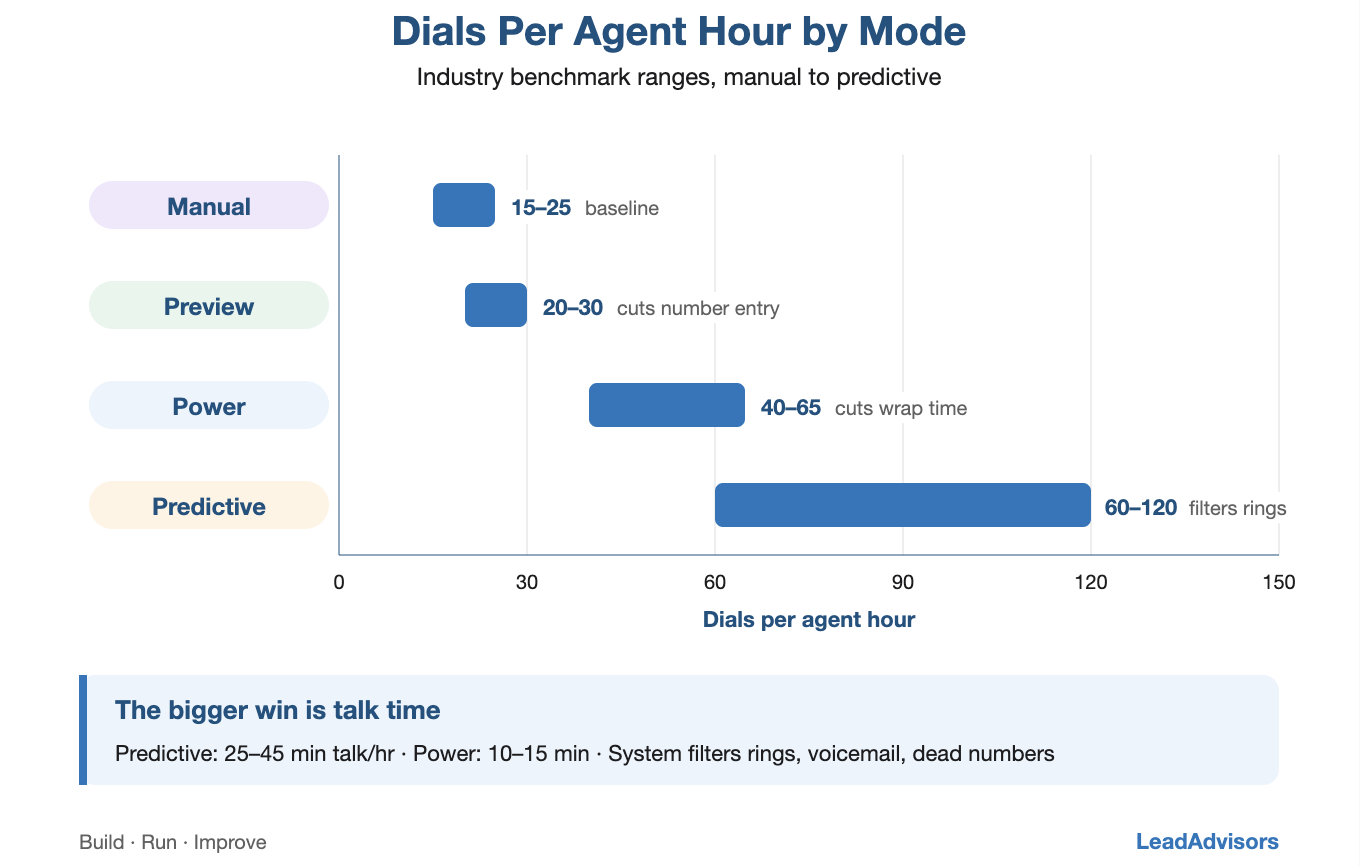
- Manual dialing (baseline): About 15-25 dials per hour. The agent looks up the record, types the number, waits through rings, handles voicemail, logs the result, and moves on. This is the starting point that all auto-dialers improve on.
- Preview dialer: About 20 to 30 dials per hour with a 10-second review window. The gain over manual comes from cutting out the number-entry step. Ring time and voicemail time stay the same.
- Power dialer: About 40-65 dials per agent hour. The system fires the next call as soon as an agent becomes free. The gain over preview comes from cutting wrap time between calls. The agent still hears rings, voicemails, and dead numbers.
- Predictive dialer: About 60-120 dials per agent hour. The bigger win is talk time: 25 to 45 minutes of live calls per hour vs. 10 to 15 minutes on power. The system filters out rings, voicemails, and dead numbers so agents spend more time talking and less time waiting.
Dialing mode is one part of a broader call center automation system that includes lead routing, QA, compliance, and disposition tracking. A March 2026 FCC fact sheet noted that call center tech, including auto-dialers, remains a key focus for both oversight and efficiency. The FCC pulled over 1,200 voice providers from its Robocall Mitigation Database in August 2025 alone. Enforcement around outbound calling keeps getting stricter.
The Nuance
Predictive’s talk-time edge only shows up when there are enough agents to keep the dropped-call rate stable. Below that point, the extra talk time is offset by compliance risk and a bad caller experience. Dropped calls cut callback rates and hurt caller ID scores over time.
| Mode | Dials/Hour | Live Talk Time/Hour | Min Agent Count | Abandoned Call Risk |
| Manual | 15–25 | 8–12 min | Any | None |
| Preview | 20–30 | 10–15 min | Any | None |
| Power | 40–65 | 15–25 min | Any | None |
| Predictive | 60–120 | 25–45 min | 8–10 minimum | Present. Requires active management. |
Which Mode Fits Which Operation: The Decision Framework
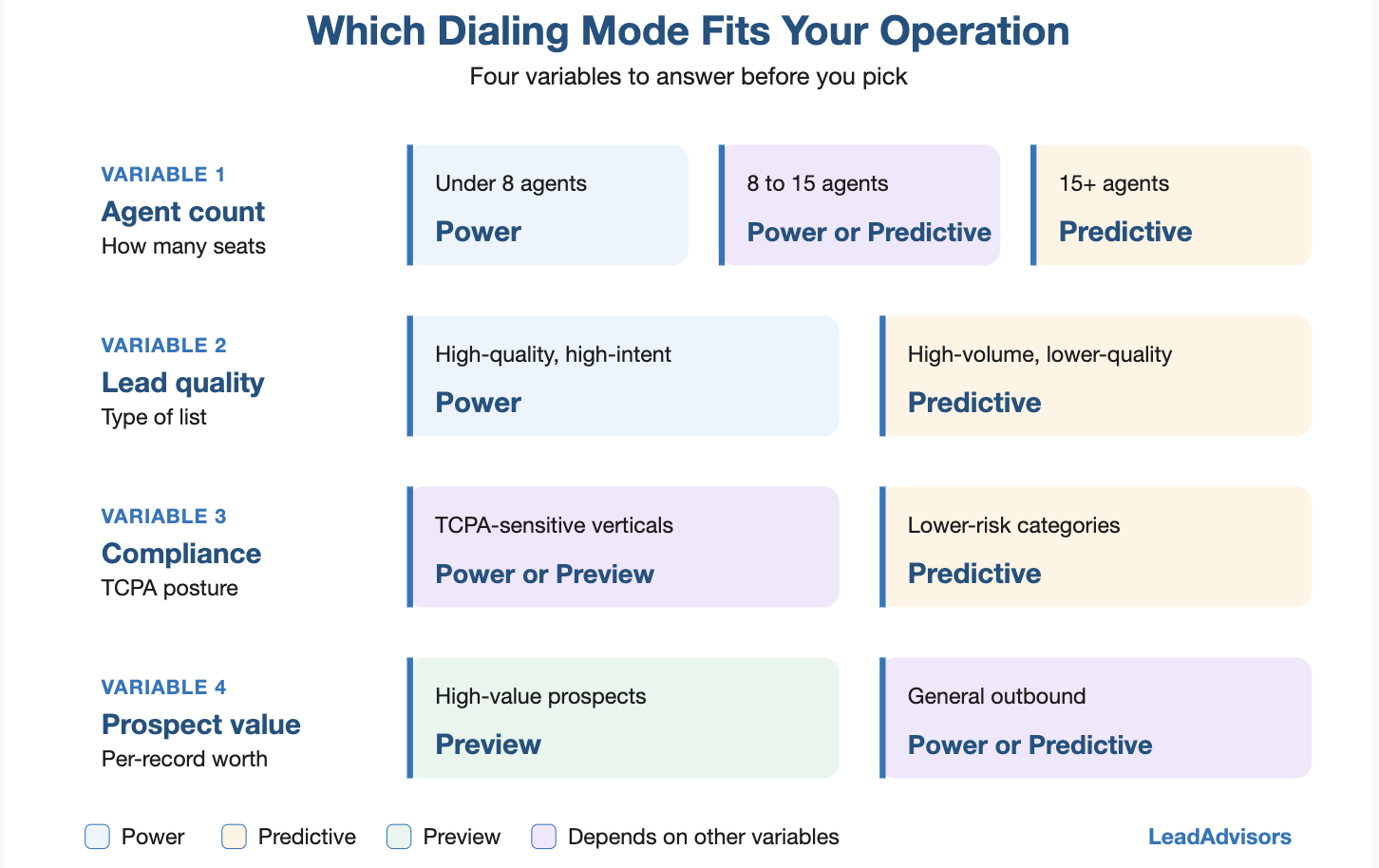
Four variables decide which mode fits a floor. Answer each one before picking.
Variable 1: Agent Count
- Under 8 agents: Use power dialing. The dropped call risk of predictive at low agent counts is not worth the small speed gain.
- 8 to 15 agents: Power or predictive. It depends on Variables 2 and 3 below.
- 15+ agents: Predictive works well here. It tends to produce the most contacts per agent hour at this scale.
Variable 2: Lead Type and List Quality
- High-quality, high-intent leads (fresh internet leads in financial services): The contact rate is already strong. Power dialing ensures every live answer reaches an agent right away, with no risk of dropped calls.
- High-volume, lower-quality leads (aged data, purchased lists): Predictive makes more sense. The answer rate is low, so raw dial volume matters more than the quality of each attempt.
Variable 3: Compliance Posture
- TCPA-sensitive operations (financial services, debt, insurance, mortgage): Use power or preview. The dropped-call risk of predictive adds raises compliance concerns in regulated verticals, where the speed gains do not justify it. The FCC’s April 2025 TCPA consent revocation order now requires callers to process opt-out requests within 10 business days using standard keywords (stop, quit, revoke, opt out, cancel, unsubscribe, end). Many states have added even stricter rules on top of these.
- Lower-risk categories (B2B appointment setting, less-regulated fields): Predictive works with the right agent counts.
Variable 4: Prospect List Value
- High-value prospect lists (enterprise B2B, warm referrals, high-ticket financial services): Use preview dialing. The prep window yields better calls when the record has useful info: company context, past interactions, or known pain points.
- General outbound lists (internet leads, aged data, cold outreach): Power or predictive. A preview adds little value when every record is cold or near-cold and has no prior context.
The Decision Matrix
| Operation Profile | Recommended Mode |
| Under 8 agents, regulated vertical, fresh leads | Power |
| Under 8 agents, B2B appointment setting | Preview |
| 8–15 agents, regulated vertical, high-volume leads | Power |
| 15+ agents, regulated vertical, high-volume leads | Predictive with abandoned call monitoring |
| 15+ agents, B2B, high-value prospect list | Preview or Power |
| Any size, re-engagement of aged data | Power |
Predictive Dialing and TCPA: The Setup Rules
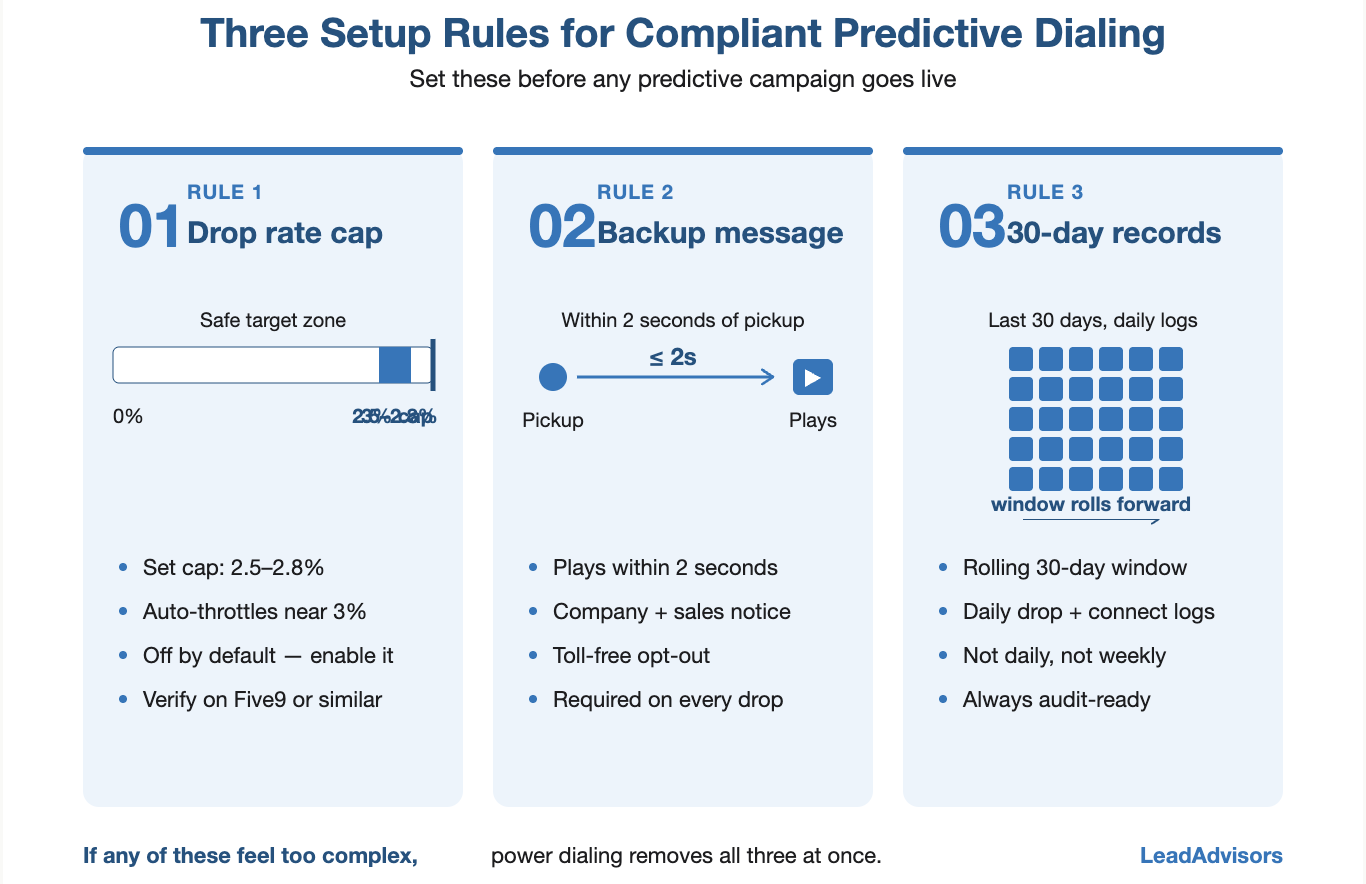
Running a predictive dialer in accordance with FTC rules requires three setup steps. Most vendors do not walk clients through these during onboarding.
Rule 1: Set a Dropped Call Rate Cap
The dialer needs an active-dropped-call rate cap. Most floors set it at 2.5%-2.8% to stay safely below the 3% legal limit. When the rate gets close, the system slows down on its own. This setting must be enabled on the platform (e.g., Five9). It is not on by default. Check it before any predictive campaign goes live.
Rule 2: Record a Backup Message
A recorded message must play right away on any dropped call, within 2 seconds of the person picking up. The message must include the company name, a note that the call was for sales, and a toll-free number to opt out of future calls. Any predictive campaign without this message is out of compliance on every single dropped call. This is true even if the 3% cap has not been hit.
Rule 3: Keep 30-Day Rolling Records
The 3% cap is measured over a rolling 30-day window. Not daily. Not weekly. The floor must keep daily logs of dropped calls and total connected calls. These records must be ready to be shown during a regulatory review.
As the FTC states, the safe harbor rules require “records documenting compliance” at all times. If any of these three steps feel too complex, power dialing removes all three at once.
Dialing Mode and Contact Rate: How the Choice Affects the Metric That Matters Most
Contact rate is the percentage of purchased leads that result in a live call. The dialing mode affects this number in ways beyond raw dial speed.
Predictive Dialing and Contact Rate
Predictive’s main edge is talk time per hour. Agents spend more time on live calls. But this does not mean more leads get contacted. It means more contacts occur per agent-hour. On a big list with a steady answer rate, predictive beats power on contacts per hour. Not because each lead is more likely to pick up, but because agents waste less time on rings and voicemails.
Power Dialing and Contact Rate
Power dialing gets fewer contacts per hour than predictive dialing on the same list. But it pairs better with speed-to-lead systems that drive the highest contact rate. A power dialer linked to an auto-lead intake webhook initiates the first call within 90 seconds of a new lead. A predictive dialer on a batch-loaded list often lacks that same real-time link. The speed edge is lost in the batch model.
For internet lead campaigns where speed-to-lead is the top driver of contact rate, power dialing with auto-first-attempt triggers often beats predictive dialing on a batch-loaded list. The speed of the first call matters more than the dial volume. When the goal is getting the most from connected calls rather than raw dials, the math shifts further toward power dialing paired with live transfer systems that route closers only to engaged prospects.
Multi-Line Dialing and the Auto-Dialer Distinction: What Floor Owners Often Miss
One mix-up trips up many floor owners: the gap between a predictive dialer and a multi-line manual dialer.
Some tools sold as “power dialers” actually dial multiple lines simultaneously per agent. That is predictive behavior, no matter what the vendor calls it. The TCPA and FTC dropped call rules apply to what the system does, not to what the label says.
Before setting up any dialer, ask one question: Does this system ever dial more than one number per agent at once? If so, the dropped-call rules apply. The product name does not matter.
The second mix-up: the gap between a predictive dialer and an ATDS (Automatic Telephone Dialing System) under the TCPA. Whether a dialer counts as an ATDS under the current FCC reading depends on how the system stores and dials numbers. It does not depend on whether it is sold as “predictive” or “power.” As shown in the FCC’s 2026 extension order on TCPA consent revocation rules, the rules around auto-dialers keep changing. Federal courts have also ruled that predictive dialers are not always ATDS systems. This is a legal question. It needs a qualified lawyer, not an ops team’s guess.
For the latest FCC guidance on ATDS rules and how they apply to a specific platform, talk to legal counsel who tracks current FCC rulings.
How to Test Your Dialing Mode Choice Before Committing
No spec sheet can tell you the right mode for your floor. You need a real test under live conditions.
The 30-Day Parallel Test
If the floor runs power now and wants to try predictive, run both modes side by side for 30 days. Put one agent group on predictive and a matched group on power. Both groups work the same lead source. Track contacts per agent hour, dropped call rate, QA scores, and how agents feel about the call flow.
The test gives real numbers. For most floors with fewer than 15 agents, power lands within 15% to 20% of the predictive range for contacts per hour, with zero risk of dropped calls. For floors with more than 20 agents on high-volume lists, predictive edge usually grows large enough to justify the extra compliance work.
What to Measure During the Test
- Contacts per agent hour
- Dropped call rate (daily)
- QA score spread: Does predictive lead to more rushed calls?
- Caller ID reputation scores at day 30
- Agent feedback on call readiness
- Disposition accuracy across both groups, are agents logging results the same way, or does the predictive queue cause more errors?