Do you recall those good old days when Google’s search engine results page was limited to nothing more than ten blue links? Well, those days are gone, and if you want your website to be found, you need to know what SERP features are. To briefly define, a SERP feature is something found on a Google search engine results page (SERP) other than a traditional organic link.
According to data obtained in early 2026, over 98% of search results on Google are comprised of at least one feature. This means that unless you are optimizing for SERP features, your website is not worth being present on the internet.
A SERP feature is something found on a Google search engine results page (SERP) other than a traditional “blue link.” This includes AI Overview, Featured Snippet, Local Pack, People Also Ask, and many more. They are meant to display something to the user as fast as possible.

What Are SERP Features?
Before we get into all of that, let’s quickly clarify what all of this means in basic terms. “SERP” is short for “Search Engine Results Page.”
A Google search results page, back in the day, consisted of ten blue links. Nowadays, it’s a lot more complicated.
So, what is a “SERP feature”? Essentially, it’s anything on that page that is an “extra” and not a normal organic link. If you’re doing search engine optimization on “SERP features,” you’re not just trying to get to number one; you’re trying to get into those special boxes to get a little extra attention.
Understanding the Different Types of SERP Features
What features are shown is determined by the features on the SERP and search intent. If Google believes you are looking to buy something, it’ll display “Commercial” features. If they believe you are looking for a quick fact, they’ll display “Informational” features.
Here is a basic list of Google SERP features by what they attempt to do for you:
Category | SERP Feature Types | Primary Goal |
Informational | AI Overview, Featured Snippets, People Also Ask, Image/Video Packs | Give you the answer immediately |
Commercial | Google Ads, Shopping Results, Rich Snippets, Popular Products | Help you buy a product |
Local/Brand | Local Pack, Knowledge Panel, Google Business Profile | Help you find a place or a specific company |
News/Events | Top Stories, Google News, Related Searches | Show you what’s happening right now |
How Google Decides What to Show
The number of Google SERP features that appear is entirely dependent on your search. For example:
- If you’re searching for a brand name like “Apple,” you may only see 2 or 3 Google SERP features on your results page.
- On the other hand, if you’re asking a complex question like “How to fix a leaky faucet,” you may see six or more Google SERP features on your results page, including a Video Carousel, People Also Ask boxes, and an AI overview.
This is where SERP features analysis comes in. If you’re analyzing SERP features to find out how to capture Google SERP features that matter to your audience, it is essential to determine how many Google SERP features appear on your favorite keywords.
Whether you’re using Ahrefs SERP or Moz SERP features to get this data, it is all about determining where the eyeballs are going and placing your content there.
Why SERP Features are Important for SEO
Let’s get real here: being #2 on the SERPs is just not what it used to be. You can have an awesome SERPs ranking, but if an AI Overview box, three Google Ads, and a featured snippet box are sitting above you, nobody is ever going to see your link.
SERP Visibility is the name of the game in 2026. If you’re not optimizing for SERP features, you’re basically just fighting over leftovers.
The Big Benefits of Winning Features
So why should you care about learning how to get your articles into Google’s SERP Features? Because of these numbers, that’s why. Here are the numbers that matter most right now:
- Higher CTR: Studies indicate that 58% of all clicks go to rich results (links that include additional information such as ratings or images). “Blue Links” alone capture about 41%.
- Double the Real Estate: Sometimes you can win in the regular organic results and also in a Featured Snippet or an AI Overview. That’s two chances to win the clicking on the same page.
- Authority & Trust: If Google trusts you enough to include you in a Knowledge Panel or a Citation, then Google is essentially telling users that you’re an authority in this space. And that’s a big deal. “Mindshare” is a marketing term that refers to getting users to remember your brand name when they need help in a particular area.
The “Zero-Click” Challenge
The flip side of all these SERP features is “zero click” search. Around 60% of searches do not require a click as Google provides the answer to the user’s query directly.
This may sound ominous; however, it is having a huge impact on SERP branding. Although the user may not click on it today and use it as a source in an AI Overview, it makes you the “go-to” expert for tomorrow.
How to Track Your Success
As goes the saying, “you cannot improve what you don’t measure.” It is essential to measure your SERP feature performance just as it is crucial to measure your keyword rankings. Here is what you should be measuring on your SERP report:
- Feature Presence: How many of your keywords have Google SERP features?
- CTR by Feature Type: Are you receiving more clicks from your featured snippets or regular links?
- AIO Citations: How often is Google’s AI using your site as a reference?
- Impression Share: How much “space” on Google’s first page do you own compared to your competition?
Your Monitoring Toolkit
To do a proper serp features analysis, you’re going to need the right equipment. For this, I recommend using a Google SERP features tool, such as the Ahrefs SERP checker tool or the Moz SERP features tool. These allow you to track SERP features on a weekly basis and see exactly when you win (or lose) a spot.
Having a good workflow for tracking SERP features is just as important as speeding up your site or writing new blog posts. If you’re not tracking the SERP, you’re basically flying blind.
The Most Important SERP Features in 2026
So if you’re going to succeed at SEO for SERP features, you need to know which boxes are actually worth your time. And let’s face it, Google has changed a lot in the last few years, so let’s look at the types of SERP features that actually drive traffic.
AI Overviews (AIO)

This is the king of all new SERP features. It’s an AI summary at the top of the page that pulls facts from multiple sites.
- The Goal: Get cited as a source.
- How to capture SERP features like AIO: You first have to rank in the top 10 for the search query. You can use an Ahrefs SERP checker to see where you rank. Then, use the “question and answer” format so it’s easy for the AI to read.
Featured Snippets
These are known as “Position Zero” boxes, and they are the ones that immediately provide a searcher with an answer to their question. While AIOs are increasing in popularity, Snippets are still present in 5% of searches and can drive your SERP features CTR to over 40%.
- How to rank SERP features like this: Answer a specific question in 40-60 words at the top of your page. Long-tail keywords (10+ words in a search query) are easiest to use for SERP features.
People Also Ask (PAA)
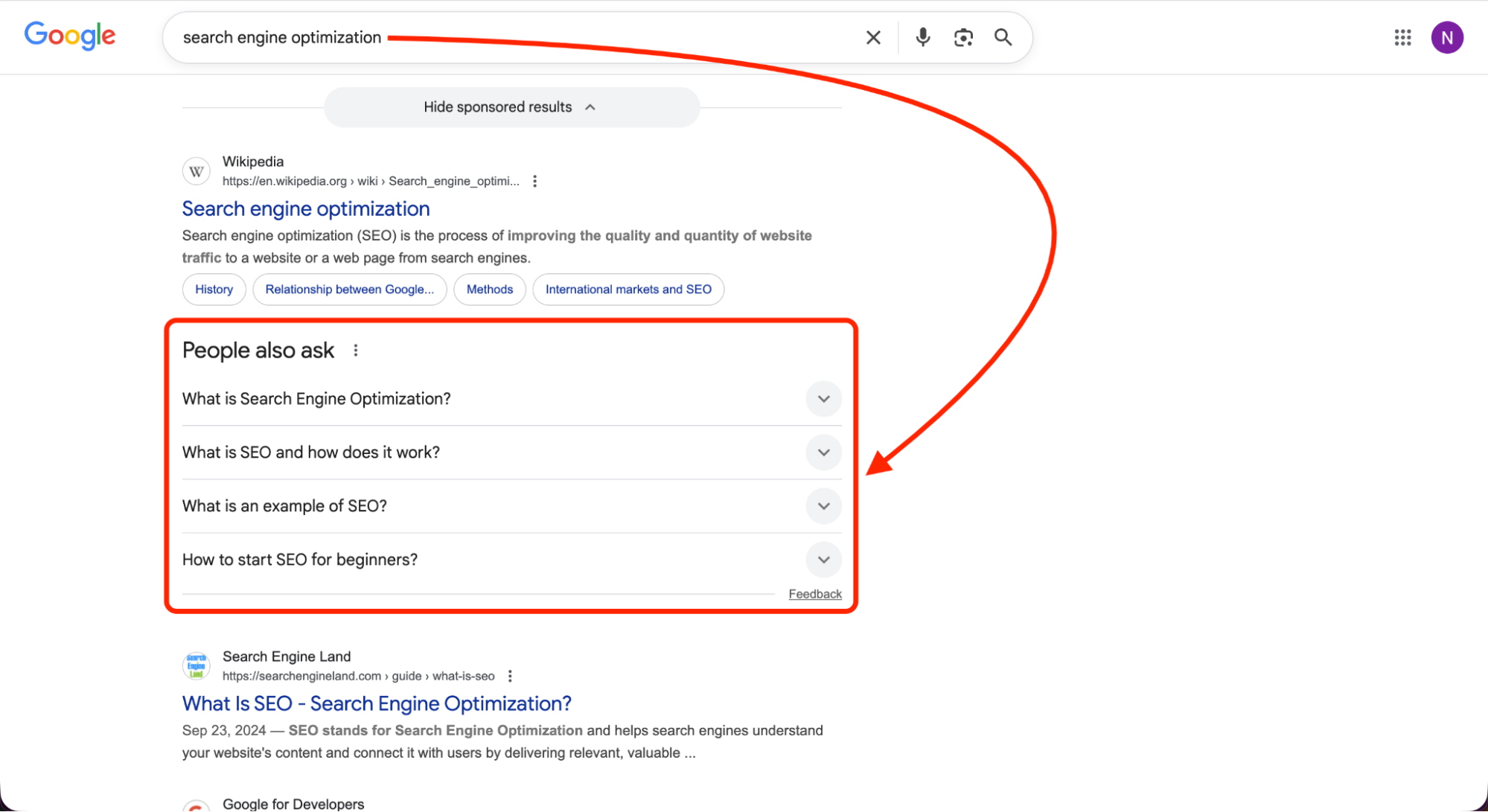
These kinds of dropdown questions are found on nearly 65% of all searches, and it appears they never end.
- Your Playbook: Make these kinds of questions H3 headings on your page. Answer 4-5 related PAA questions to dominate a huge chunk of the SERP.
Knowledge Panels
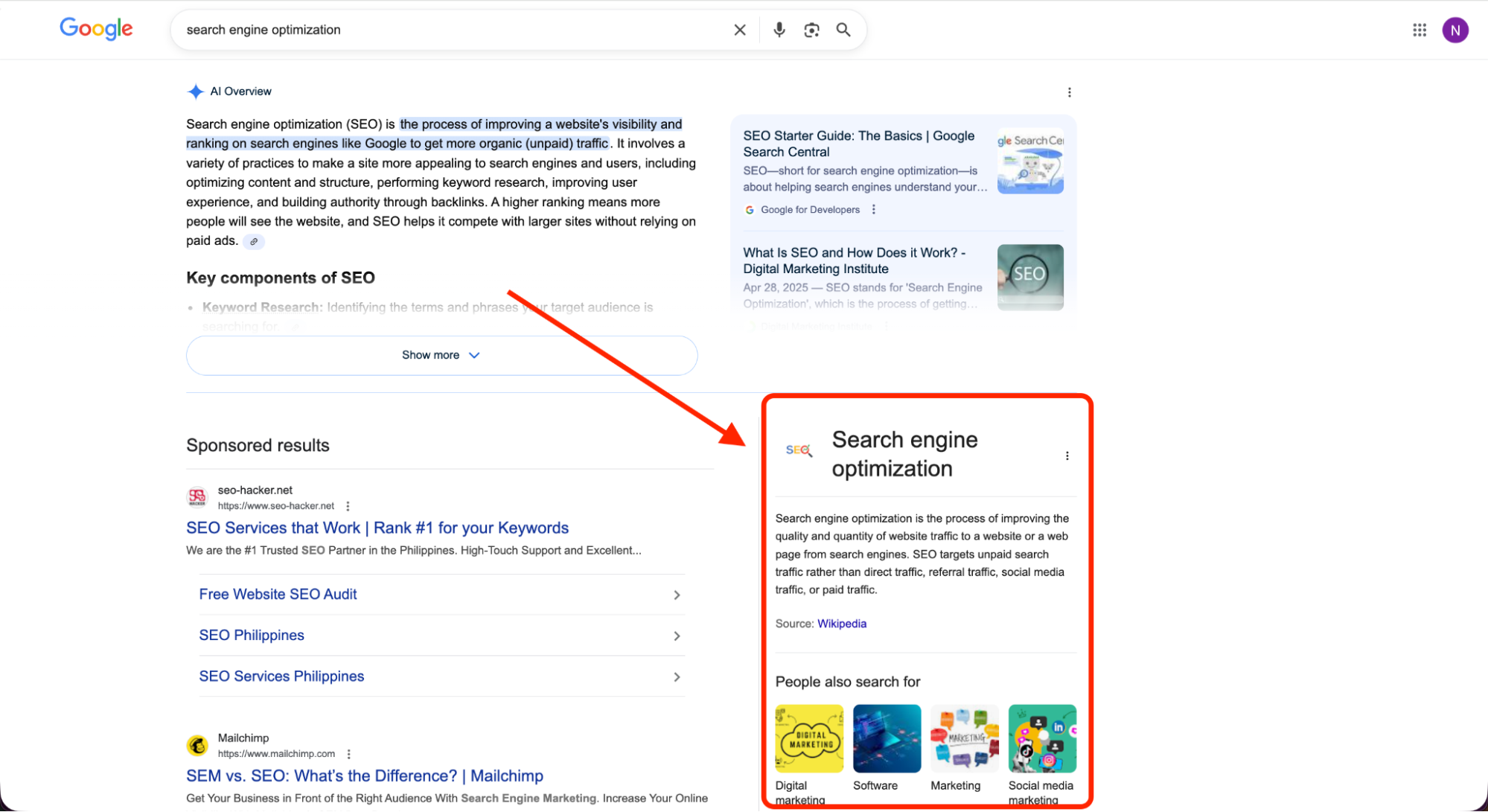
These appear on the right side of the screen (desktop) and display verified information about a person or brand.
- How to get into SERP features for your brand: Use “Organization” or “Person” schema markup. This helps Google’s Knowledge Graph understand who you are.
Local Pack (Map Pack)
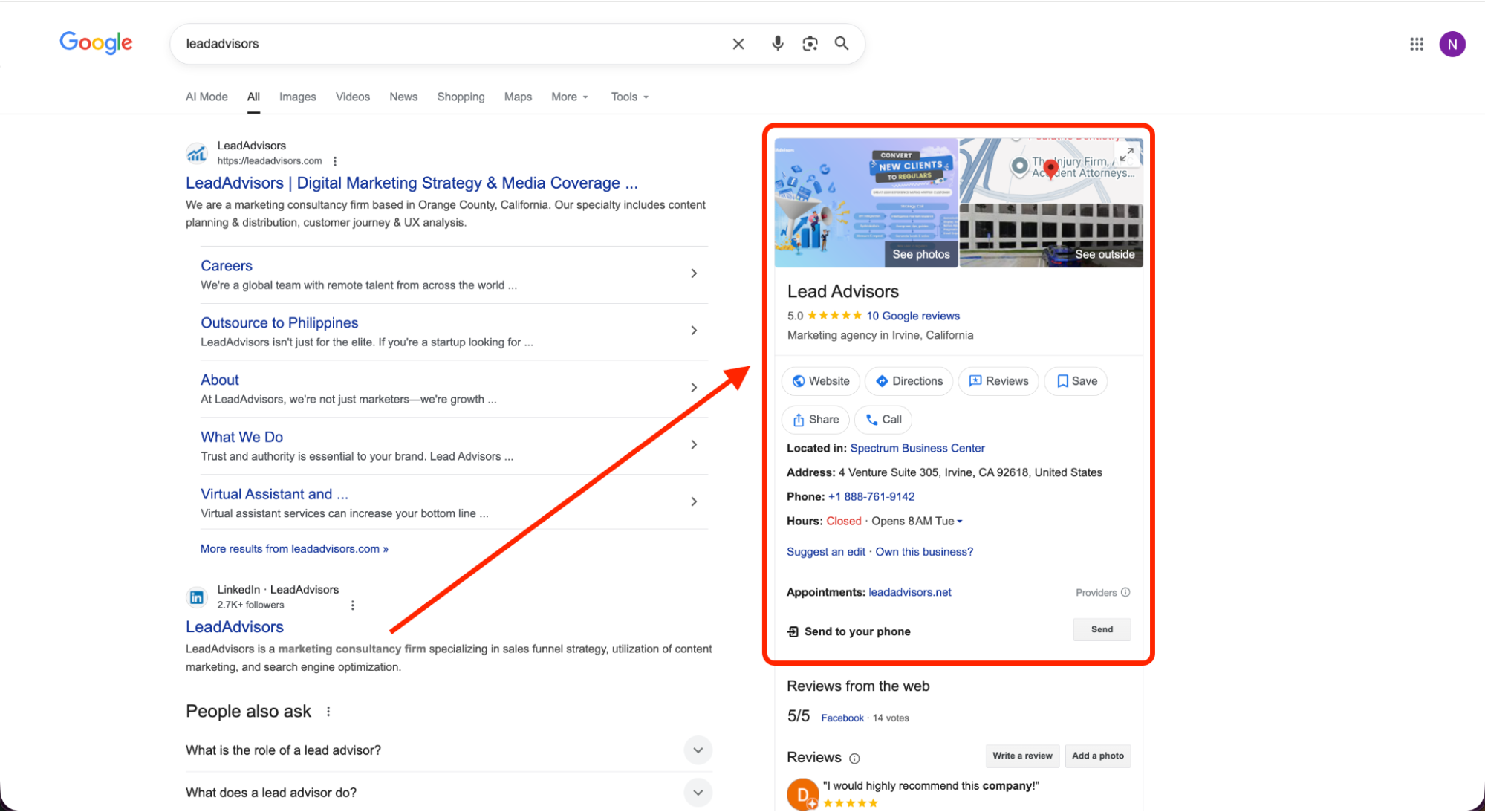
If you have a local business, this is the most coveted Google SERP ranking for you. It includes a map and three business listings.
- The Impact: 42% of local searchers click these results.
- How to optimize for SERP features in local: Claim your Google Business Profile and ensure that your business’s phone number and address are consistent everywhere.
Image & Video Packs

Google displays these when it thinks a picture is more relevant, like for recipes or how-to fixes.
- Optimization Tip: For videos, use YouTube and add “chapters” for easier viewing. For images, use “alt” tags and descriptive file names so Google knows what the picture is of.
Rich Snippets & Popular Products
These are the star ratings, price, and “in stock” indicators on organic results.
- The Advantage: Rich snippets earn 58% more clicks than regular results, which only get 41%. To achieve rich snippets, add “Product” or “Review” schema to your site.
Top Stories & Events
This is for news and popular content. The only requirements are speed and authority.
- Requirement: To achieve Top Stories & Events, implement the Article or Event schema and maintain high editorial standards.
Advanced: Entity-First & Schema-Smart SEO
In 2026, SEO is no longer just about keywords; it’s about entities. An entity is essentially something that Google understands. An example of something Google understands is “a person,” or “a brand,” or “a product.”
Google’s Knowledge Graph is like a huge brain that links all of these entities together. Instead of actually reading what you write, Google is trying to understand who you are and what you’re selling. And in order to do that, you have to start speaking Google’s favorite language: Schema Markup in JSON-LD format.
Why Schema is Your Secret Weapon
Adding schema markup is like putting a label on every part of your website so Google doesn’t have to guess.
- The Reality: About 72% of sites on the first page are using schema, but a huge percentage of websites (more than 20%) are not using schema. This is your chance to leapfrog.
- The Result: Want to know how to get into those coveted SERP features like star ratings, price tags, or recipe steps? Schema is the answer!
Essential Schema Types for 2026
To maximize your SERP visibility, you should focus on these key labels:
Schema Type | What it tells Google | Best For |
Organization | “This is my brand, logo, and social links.” | Trust & Knowledge Panels |
Product | “This item costs $50, and we have 10 in stock.” | Shopping & Rich Snippets |
FAQPage | “Here are the 5 most common questions people ask us.” | Winning PAA Boxes |
Article | “This is a helpful blog post written by a real person.” | AI Overviews & News |
HowTo | “Follow these 4 steps to fix your sink.” | Video & Image Carousels |
Your Technical Checklist
Don’t let the word “code” intimidate you. This is how you can use SERP features with structured data without being a coder:
- Use a Generator: Google has many SERP feature generators available, such as the ones created by Merkle or Rank Math.
- Validate Everything: Make sure everything works before going live with Google’s Rich Results Test. One typo can keep you from appearing on the SERP snippet.
- Automate with Your CMS: If you use WordPress or Shopify, use the Rank Math or Yoast plugins. They will automatically add a list of Google SERP features schema to your website, saving you hours of work.
Friend-to-Friend Tip: I had a client with amazing content and no SERP features. We soon realized the problem: “invalid schema” because of one missing comma. When corrected, their SERP feature click-through rates increased by 20% in one week!
Avoid the “Invisible” Trap
If you notice Google’s SERP features showing up in the results for your keywords but you don’t appear in them, it’s most likely that you don’t have schema, or it’s not properly implemented. Google wants to show your information, but you have to help them find it.
Measuring & Monitoring SERP Features
I think you’ve heard the following statement before: “You can’t manage what you don’t measure.” This is absolutely true for your SERP ranking. As you know, the Google SERP is constantly changing almost every day, and you should always monitor which boxes you are winning and which boxes are being taken by your competitors.
The only way to know whether your hard work is paying off is to understand your SERP visibility.
The Best Tools for the Job
You don’t have to keep going to Google every hour to check to see if any of your SERP features are showing. There are some great SERP tools out there that do all of the work for you:
- Google Search Console: This is your “home base.” Check out the Search Appearance tab to get a look at your SERP metrics, like how many people saw your rich snippets versus your regular links.
- Ahrefs SERP Checker: I love this tool for looking at the past. There is a SERP features history tool from Ahrefs that allows you to use their SERP features history tool to check to see if your feature has disappeared from Google results due to an AI Overview or a new competitor.
- Semrush Position Tracking: This is great for a daily SERP feature monitor. You can use this tool to filter your keywords to only view those that have a specific feature owned by you, such as an Image Pack or Site Links.
- SE Ranking: This is a great Google SERP features tool to use to find out what features are showing on Google results for every single keyword you want to track.
Key Metrics to Track (Your Success Scorecard)
Don’t just look at your “rank.” Use this SERP report template to track what actually drives traffic:
Metric | Tool | How Often? | Your Goal (KPI) |
Feature Presence (%) | Semrush / Ahrefs | Weekly | Grow by 10% every 3 months |
Click-Through Rate (CTR) | Search Console | Monthly | Keep it steady, even with AI changes |
AIO Citation Count | Manual Check / API | Monthly | Increase mentions in AI summaries |
Local Pack Actions | Google Business Profile | Monthly | More calls and directions monthly |
Feature Type Visibility | SE Ranking | Weekly | Increase the total number of features owned |
Pro Tip: Look at the Whole Page
In terms of SERP features, you should not only look at your organic successes, but also look at your Google ads and shopping results. If you see that all you are seeing at the top of the page are ads, then perhaps you should be putting your time into another keyword where you can actually win a featured snippet.
Using a SERP SEO tool to look at all of your “portfolio” of keywords in terms of SERP features will save you time. It’s not just about being present; it’s about owning the most valuable real estate.
Step-by-Step Optimization Playbooks
Ready to stop reading and start winning? These simple “playbooks” will walk you through the exact process of getting into SERP features. Most of these will take just a few minutes, and the impact on your SERPs will be massive.
1. The Featured Snippet & AI Overview (AIO) Play
This play will get you to “Position Zero” faster than any other method.
- The Move: Identify a query your customers ask most often. This query will be the title of the H2 heading.
- The Answer: Create an answer and place it directly under the heading. This should be 40-60 words.
- The Detail: Add a bulleted list or table directly after the answer. Google loves to feature these in the SERP snippet.
- Time Investment: 10–15 minutes per page.
2. The People Also Ask (PAA) Strategy
Here is how to find SERP features opportunities by simply looking at what Google is already telling you.
- The Move: Search for your main keyword and look at the “People Also Ask” box. Choose 4-6 questions.
- The Content: Add those questions as H3 headings near the bottom of your article.
- The Answer: Add a 1-2 sentence direct answer to each question.
- Schema Tip: If you have a number of these, you can use the FAQPage schema to help your answers stand out.
- Time Investment: 20–30 minutes per page.
3. The Product & Rich Result Play
If you are a merchant, this is how to rank serp features that actually drive sales.
- The Move: Add a “Pros & Cons” list and a clear pricing table to your product page.
- The Tech: Add a Google SERP features tool (or plugin) to add Product, Offer, and Review schema.
- The Visuals: Add a high-quality, original image. Do not simply copy and paste the manufacturer’s image!
- Time Investment: 30–45 minutes per product.
4. The Local Pack (Map Pack) Play
If you are a local business, this is arguably the most valuable SERP feature you can own.
- The Move: Complete filling out your Google Business Profile. Yes, that means you should not skip “Services” or “Photos.”
- The Consistency: Make sure that your Name, Address, and Phone Number (NAP) are consistent across your website, Facebook page, and Yelp page.
- The Trust: Ask happy customers to write reviews, and this is the key to it all: respond to those reviews in 48 hours or less.
- Time Investment: 1 to 2 hours to start, 30 minutes a week to keep it up.
Quick Optimization Checklist
Feature | Optimization Secret | Key Tool |
Featured Snippet | 50-word direct answer | Ahrefs featured snippets |
Rich Snippet | Validated Schema Code | Google SERP features tool |
Local Pack | Consistent NAP info | Google Business Profile |
AIO Citation | E-E-A-T & Expert citations | SERP features analysis |
By using these playbooks, you’re not only guessing how to optimize for SERP features—you’re using a proven system to take up more space on the Google SERP.
Common Pitfalls to Avoid
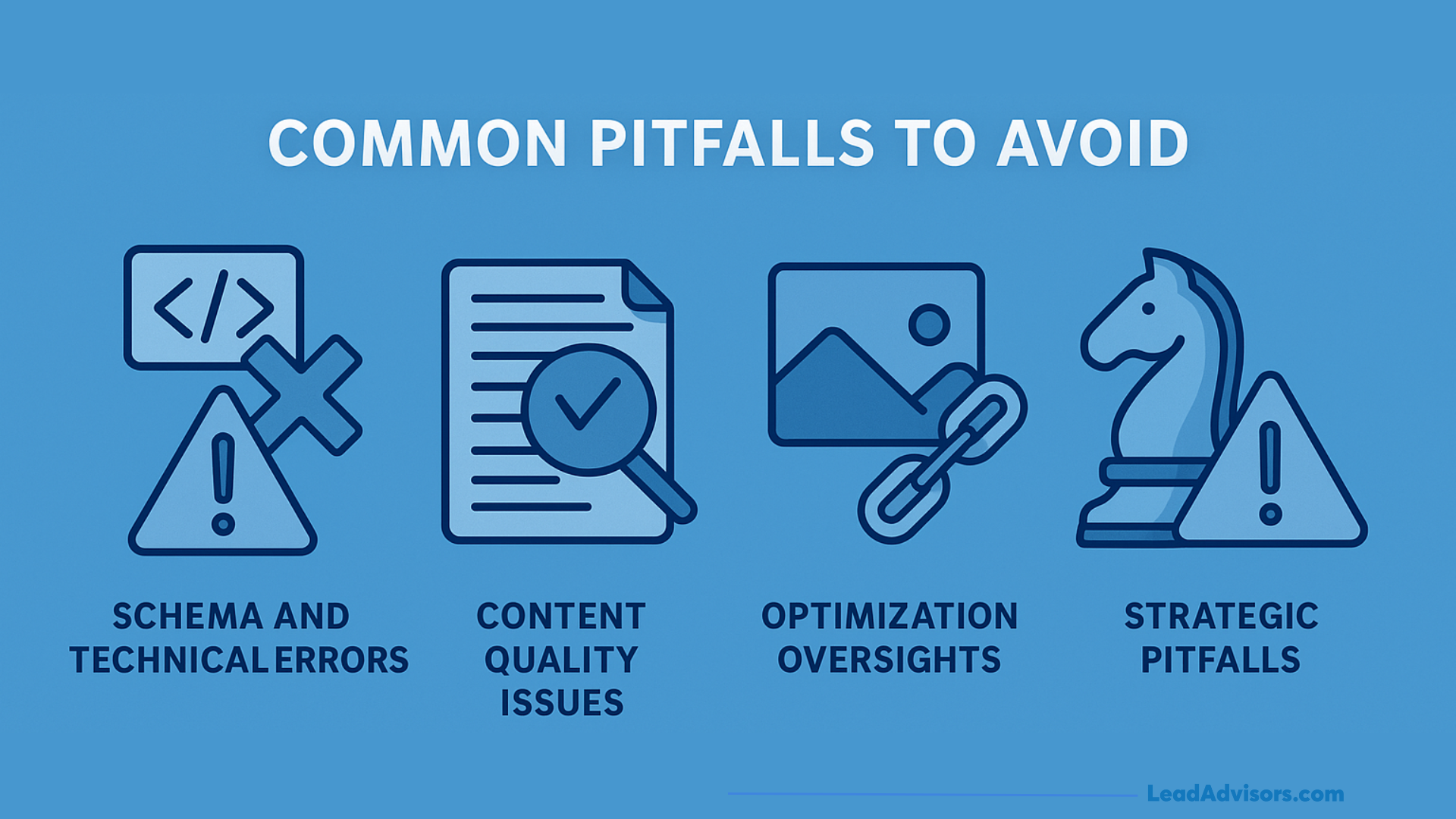
Even the slightest error can prevent Google from displaying your SERP feature. In 2026, the distance between “visible” and “invisible” is only measured by several technical and content-related errors.
Schema and Technical Mistakes
If your “translator” (Schema) is broken, Google will not understand your content.
- Ghost Markup: Do not mark up content that is not on the page. If you are using Schema for “Review” but do not have reviews on the page for the user, Google may penalize your serp ranking.
- Conflict & Clutter: Using two different schemas for the same content (for example, using both “Article” and “BlogPosting” on the same page for the same content) will confuse the Google SERP Features tool.
- Validation Blindness: Always use the Rich Results Test. If the Rich Results Test displays a red error, your rich snippets will not be displayed.
Content Quality Issues
Google is becoming better at recognizing “thin” content, which means content that doesn’t really help anyone.
- Too Short: If your response is under 30 words, it is probably too short to be featured.
- The “Context” Trap: Don’t put too much “fluff” before you get to the good stuff! If you have three paragraphs on “A History of Plumbing” and then finally get to “How to Fix a Leaky Pipe,” Google will completely overlook you and give another writer an Overview.
- Stale Data: Google loves fresh timestamps! If your “Best Laptops” article is from 2024, you’ll be invisible in 2026.
Strategic Missteps
Sometimes, the mistake isn’t how you’re optimizing, but what you’re optimizing for.
- Fighting the Giants: 80% of informational searches don’t include a click in 2026. If the keyword Google answers with its built-in calculator or weather widget, then you’re fighting for a 0% click rate.
- Mobile Neglect: Google’s mobile SERP features dominate the screen. Make sure your site isn’t slow or hard to scroll, or visitors will click the serp before your page even has a chance to load.
- Ignoring the “Niche”: People tend to forget the serp features, icons, and the smaller features like “Research Guides.” Sometimes, there’s less competition for the smaller spots than the main featured snippet.
The “Pitfall” Summary Table
Pitfall | Why It Hurts | The Fix |
Invalid Schema | No rich results/stars | Use the Rich Results Test weekly |
Burying the Answer | No AIO citation | Put your 50-word answer at the top |
Inconsistent NAP | Lose the Local Pack | Match Name/Address/Phone everywhere |
Ignoring Search Intent | High bounce rate | Match your content to the SERP feature type |
Quick Peer Tip: I have witnessed experts lose their #1 SERP ranking simply because they forgot to add alt text to their main image. Google is using those images to display their “Image Pack” feature—don’t leave that traffic on the table!
Tracking Template (Summary Table)
The key to staying on top of the SERPs, of course, is having a system. So, I’ve created the following framework, which you can just copy and paste into your own sheet. This will allow you to clearly visualize how you’re doing on all of the Google SERP features, instead of just looking at one number.
This framework will allow you to plug in your specific SERP keywords and see where you’re succeeding and where you need to work harder.
Your SERP Performance Scorecard
Metric | Best Tool | Frequency | Your Goal (KPI) |
SERP Feature Presence (%) | Semrush / Ahrefs | Weekly | Grow by 10% every quarter |
Click-Through Rate (CTR) | Google Search Console | Monthly | Stay above your baseline (even with AI) |
Feature Type Visibility | SE Ranking / Semrush | Weekly | Increase the total number of features owned |
AIO Citation Count | Manual or API check | Monthly | Gain more “mentions” than last month |
Local Pack Actions | Google Business Profile | Monthly | More calls, clicks, and directions |
Rich Snippet Display Rate | Search Console | Weekly | Increase the number of “eligible” pages |
Knowledge Panel Accuracy | Manual Review | Monthly | Keep your brand info 100% correct |
SERP Volatility Index | Any Rank Tracker | Daily | Spot “Google Updates” before they hit you |
Pro Tip: The “Filter” Secret
While most people will only look at the list of rankings, you should be cleverer. You should use your SEO SERP tool to filter through the list of keywords for particular features. For example:
- Filter through for keywords that have a featured snippet.
- Filter through for ones that you do not currently own.
- Filter through for ones that use the “Snippet Playbook” that we discussed above.
This is how you identify where the “low-hanging fruit” is. It is much easier to get a featured snippet for a keyword that you currently rank for compared to trying to rank for a new keyword.
Why Frequency Matters
The Google SERP is constantly changing. If you only look at your SERP report once a month, you may not see that a new AI overview is taking all of your traffic. By monitoring the SERP volatility index once a day and SERP feature wins once a week, you can prevent your traffic from taking a huge hit.