Schema markup is similar to a language that helps search engines understand your website. While it is obvious to people that your page is about a product, recipe, or local business, search engines still require additional clues.
Structured data helps here – it is a universal format that tells search engines what your page is about. By 2025, schema markup will no longer be exclusive to Google. AI models, such as ChatGPT and Perplexity, utilize structured data to establish context, verify facts, and cite sources. If you are willing to be visible on both traditional search results and AI platforms, then adding schema markup is the minimum you can do.
What Is Schema Markup? (And Why Every Website Needs It)

Schema markup is a programming language that you insert into your web pages to make the search engines smarter about your content. Search engines no longer have to guess the topic of your page from natural language processing only; they can directly interact with structured data markup that unambiguously sets the characters—be it a person, product, event, or article.
Here’s the simple breakdown:
- Schema markup = Structured data with Schema.org’s standardized vocabulary
- Structured data = Data that is structured in a way that a machine can easily read and understand
- Schema.org = The open source library of schemas supported by Google, Bing, Yahoo, and Yandex
Once you have inserted schema markup into your site, you can display rich results—that is, those augmented presentations in Google search that can show star ratings, prices, pictures, FAQs, and more. These rich snippets attract attention much more than the regular blue hyperlinks and thus the chances of getting clicked increase significantly.
Things, Not Strings: How Schema Changes the Game
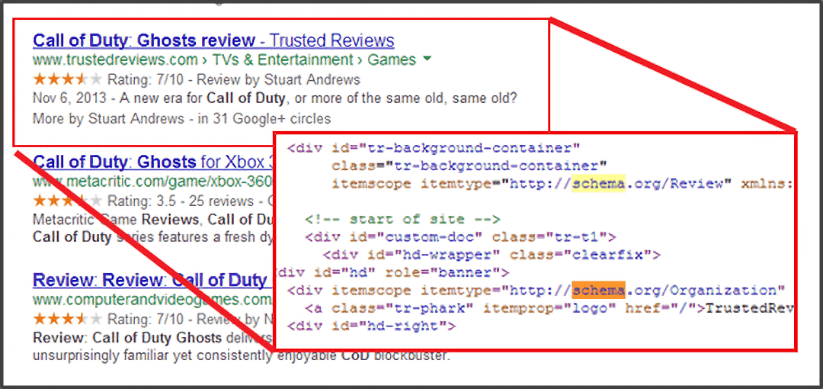
Search engines traditionally interpreted content as strings of text. They’d analyze words, context, and patterns to guess what your page was about. Schema markup transforms this approach by defining things—real-world entities with specific properties and relationships.
For example, without schema markup, Google sees text about “John Smith, founder of TechCorp, published an article on AI.” With schema markup, Google understands:
- Person (John Smith) → worksFor → Organization (TechCorp)
- Person (John Smith) → author → Article (AI guide)
- Organization (TechCorp) → publishes → Article
This is what Google calls “things, not strings.” Instead of interpreting language, search engines now read explicit relationships that connect entities across your entire website and beyond.
Essential Schema Vocabulary You Should Know
| Term | What It Means |
| Schema Markup | Code added to HTML using Schema.org vocabulary |
| Structured Data | Information formatted for machines to read easily |
| JSON-LD | The recommended format for writing schema markup |
| Rich Results | Enhanced search displays (stars, prices, FAQs) |
| Knowledge Graphs | Google’s database of connected entities |
| @type | Defines what kind of thing you’re describing (Person, Product, Article) |
| @id | Unique identifier that connects related entities |
How Schema Markup Works (The Technical Side, Simplified)
When you implement schema markup on your site, here’s what happens behind the scenes:
- Crawl — Googlebot visits your page and discovers your structured data items
- Parse — Search engines extract the JSON-LD code or microdata from your HTML
- Validate — The schema type and properties are checked for errors
- Index — Valid structured data gets added to Google’s Knowledge Graph
- Enhance — Your page becomes eligible for rich results (not guaranteed)
The keyword here is “eligible.” Adding schema markup doesn’t automatically generate rich snippets. Google decides whether your content deserves enhanced display based on quality, relevance, and search intent.
Real Example: The Power of Recipe Schema
Let’s say you publish a recipe for chocolate chip cookies. Here’s what users search for when they see your listing:
Without Schema Markup:
Chocolate Chip Cookies – Best Recipe Ever
Just the page title and meta description. Nothing stands out.
With Recipe Schema:
Chocolate Chip Cookies – Best Recipe Ever ⭐⭐⭐⭐⭐
🕐 30 min 👤 24 cookies 🔥 180 calories
[Recipe image appears in results]
- Backlinko’s voice search study found that 40.7% of voice answers come from featured snippets
- Schema markup statistics show pages with schema received a 40% higher CTR than pages without
- Digital Loop research reports clients saw an average 7.6% increase in CTR after implementing structured data
The difference? Rich snippets with schema markup can increase click-through rates by up to 30%. Users can immediately see prep time, serving size, ratings, and an appetizing image—all before clicking.
Why Schema Improves SEO (Even Though It’s Not a Ranking Factor)
Google has repeatedly stated that schema markup isn’t a direct ranking factor. However, the indirect benefits are massive:
- Higher click-through rates → More traffic signals → Better engagement metrics
- Expanded SERP real estate → More visibility → Brand authority
- Reduced ambiguity → Stronger content-to-query matching → Better user satisfaction
When you help search engines understand your content with structured data, you reduce the computational overhead needed for natural language processing. This means faster indexing, more accurate categorization, and improved chances of appearing for relevant searches.
Schema Markup & AI: Why This Changes Everything in 2025
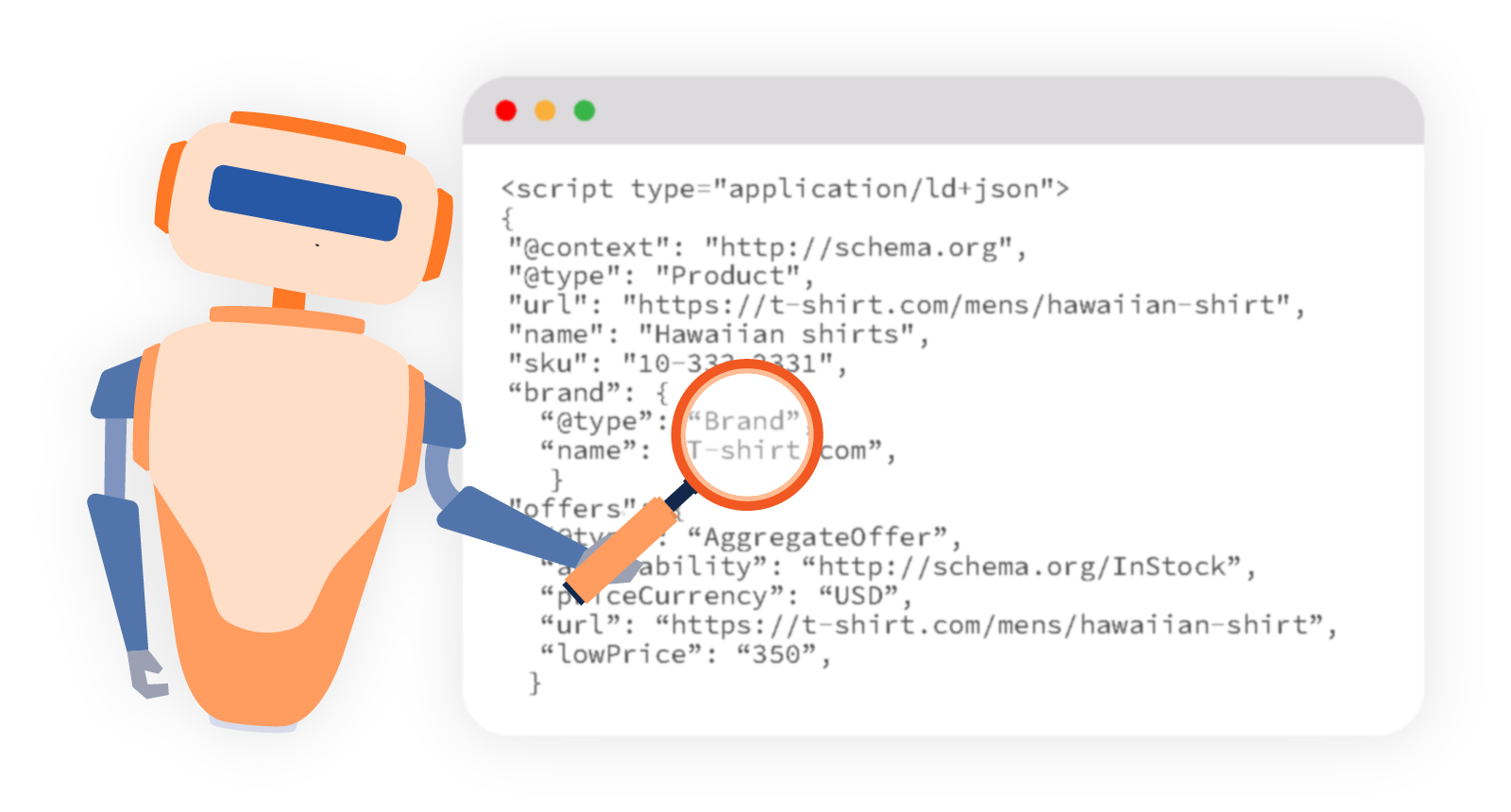
Here’s what most SEO guides miss: Schema markup isn’t just for Google search anymore. AI models are now crawling the web, and they rely heavily on structured data to understand context, verify information, and build citations.
How AI Models Use Structured Data
ChatGPT, Perplexity, Google’s AI Overviews, and other generative AI systems need to quickly understand:
- Who wrote this? (Person schema + author properties)
- Who do they work for? (Organization schema + sameAs profiles)
- What expertise do they have? (E-E-A-T signals through connected entities)
- Is this information current? (datePublished, dateModified)
- What’s the relationship between entities? (mainEntity, about, mentions)
When your article schema connects to author markup, which connects to organization markup, which links to verified social profiles—AI systems can trace credibility. This increases the likelihood of your content being cited in AI-generated responses.
Building Page-Level Knowledge Graphs
Think of your website as a network of connected entities. Every blog post, product, person, and organization should link together through schema markup. This is what we call a “page-level knowledge graph.”
Here’s how to structure it:
Your Organization (@id: https://yoursite.com/#organization)
↓
Your Authors (@id: https://yoursite.com/team/john-smith#person)
↓
Your Content (@id: https://yoursite.com/blog/ai-guide#article)
↓
Related Products (@id: https://yoursite.com/products/ai-tool#product)
When you use @id properties consistently, you create a web of relationships that search engines and AI models can follow. This dramatically improves how machines interpret the meaning behind your page content.
Why Voice Search Depends on Schema Markup
When someone asks Alexa or Google Assistant a question, the system needs to find a confident answer fast. Voice assistants prioritize content with clear structured data because it removes ambiguity. According to DemandSage’s voice search statistics, over 80% of voice search answers on Google Assistant come from the top three search results.
For local queries like “What time does Joe’s Coffee open?”, the local business schema provides exact hours, contact details, and location data. For factual queries like “Who founded Microsoft?”, organization markup and person schema deliver precise answers.
According to research on voice search optimization, 40.7% of voice search answers come from featured snippets, and those featured snippets almost always have some form of structured data.
The 15 Most Important Types of Schema Markup for 2025
Not all schema types deliver equal value. Focus on these high-impact options based on your content type:
Foundation Schema (Every Site Needs These)
- Organization Schema — Establishes your brand identity, logo, social profiles, and contact details across the entire website
- Website Schema — Includes SearchAction markup for the sitelink search box in Google results
- WebPage Schema — Describes every page on your site with breadcrumbs and navigation context
- BreadcrumbList — Shows navigation paths in search results and improves site structure understanding
Content & Publishing Schema
- Article Schema — For news articles, blog posts, and editorial content with author, publish date, and headline
- BlogPosting Schema — Similar to Article, but specifically for blog content on your site
- Person Schema — Critical for E-E-A-T; connects authors to their expertise, credentials, and social profiles
Interactive Content Schema
- FAQPage Schema — Creates expandable drop-down menu items directly in search results for common questions
- HowTo Schema — Step-by-step instructions that appear as rich snippets with images and time estimates
Ecommerce & Review Schema
- Product Schema — Displays prices, availability, brand, and images for any product on ecommerce websites
- Offer Schema — Nested within Product schema to show current pricing, discounts, and purchase options
- AggregateRating / Review Schema — Those star ratings you see in search results that boost more traffic and conversions
Media & Visual Schema
- VideoObject — Makes your videos eligible for video carousels, timestamps, and enhanced displays
- ImageObject — Helps images appear in Google Images and visual search with proper attribution
Local & Event Schema
- LocalBusiness Schema — Essential for any business with a physical location; improves Google Maps visibility and enables search engines to show hours, directions, and reviews
Bonus schema types worth considering: Course schema for educational content, JobPosting for hiring pages, Event schema for conferences or webinars, and SoftwareApplication for tools and apps.
Which Schema Markup Should You Actually Use? (Decision Framework)
Don’t waste time adding every schema type to every page. Instead, use this strategic framework:
Step 1: Identify Your Page Type
Start by categorizing what each page on your site actually is:
- Homepage → Organization + Website schema
- Blog post → Article + Person (author) schema
- Product page → Product + Offer + Review schema markup
- Service page → Service + LocalBusiness schema (if applicable)
- FAQ page → FAQPage schema
- Video content → VideoObject schema
Step 2: Analyze Your Competitors’ Schema
Run competitor URLs through the Google Rich Results Test or schema validation tools. Look for:
- Gaps — Schema types they’re missing that you could implement
- Baseline — Minimum schema everyone in your niche uses
- Opportunities — Advanced schema markup that differentiates you
Step 3: Match Schema to SERP Features
Search for your target keywords and observe what Google displays. If you see:
- FAQ boxes → Add FAQPage schema
- Star ratings → Add AggregateRating schema
- Recipe cards → Add Recipe schema
- Video carousels → Add VideoObject schema
- Local pack results → Add LocalBusiness markup
Google is literally showing you which types of schema markup drive visibility for those queries. Give the search engines what they’re already prioritizing.
Schema Markup Formats: JSON-LD vs Microdata vs RDFa
All three formats use the same Schema.org standardized vocabulary—they just differ in how you write the code.
JSON-LD (Recommended Format)
JSON-LD (JavaScript Object Notation for Linked Data) is the preferred method for implementing schema markup because:
- Clean separation — Code sits in a <script> tag, separate from your HTML
- Easier debugging — No embedded widgets or inline complexity
- Google-recommended — Officially preferred by big search engines
- Flexible placement — Works in <head> or <body> sections
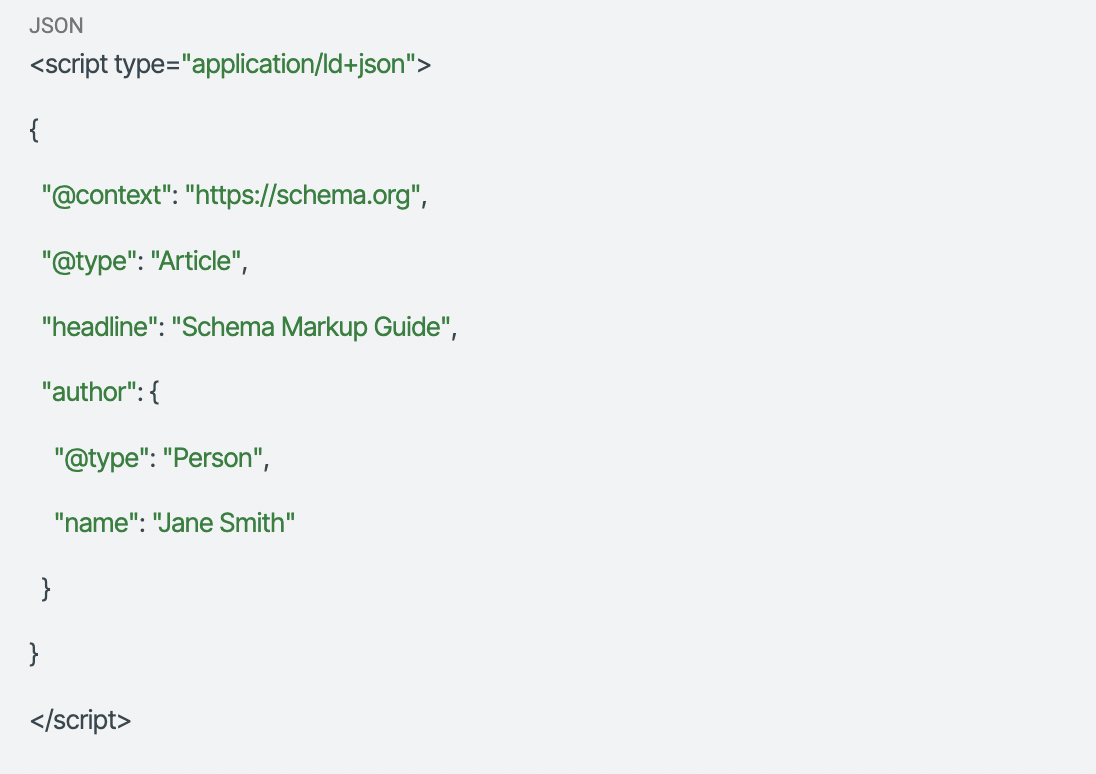
Here’s what basic JSON-LD markup looks like:
Microdata & RDFa (Alternative Formats)
Microdata and RDFa embed schema properties directly into your HTML tags. While valid, they’re harder to maintain and debug. You’d only use these for:
- Legacy systems that require in-page markup
- Platforms where you can’t add JavaScript code snippets
- Specific technical SEO requirements where inline semantics matter
For 99% of websites, stick with JSON-LD code.
How to Create Schema Markup (4 Methods from Easiest to Most Powerful)
Method 1: Use a WordPress Plugin (Fastest Setup)
If you’re running WordPress, plugins handle most schema markup automatically:
- Rank Math — Excellent for Article, Product, and local business schema with built-in validation
- Yoast SEO — Solid foundation for Organization, Website, and Article schema
- Schema Pro — Advanced option for custom schema types and complex relationships
These WordPress plugins generate JSON-LD markup behind the scenes. Just fill out the form fields in your content management system, and the plugin creates schema automatically.
Method 2: Use Schema Markup Generators
Free tools that create schema markup code for you:
- Merkle Schema Generator — Supports most common schema types
- Schema.dev — Advanced generator with entity relationship features
- RankRanger Schema Generator — Simple interface for quick code snippets
- IPLocation Schema Generator — Create any common type of JSON-LD markup instantly
Copy the generated JSON-LD code and paste it into your page’s <head> section or use Google Tag Manager for implementation.
Method 3: Use AI to Write Schema Markup
ChatGPT and Claude can generate structured data if you prompt them correctly:
Good prompt:
“Create JSON-LD schema markup for an article titled ‘AI Guide’ written by John Smith, published on Jan 15, 2025. Connect the author to our organization ‘TechCorp’ using @id properties.”
Why this works: You specify the schema type, required properties, and relationships. Always validate AI-generated schema with Google’s testing tools—AI sometimes invents invalid properties.
Method 4: Write Your Own Code (Maximum Control)
For maximum flexibility and clean implementation, write JSON-LD markup manually. This gives you full control over entity connections and nested schema types.
Template structure:
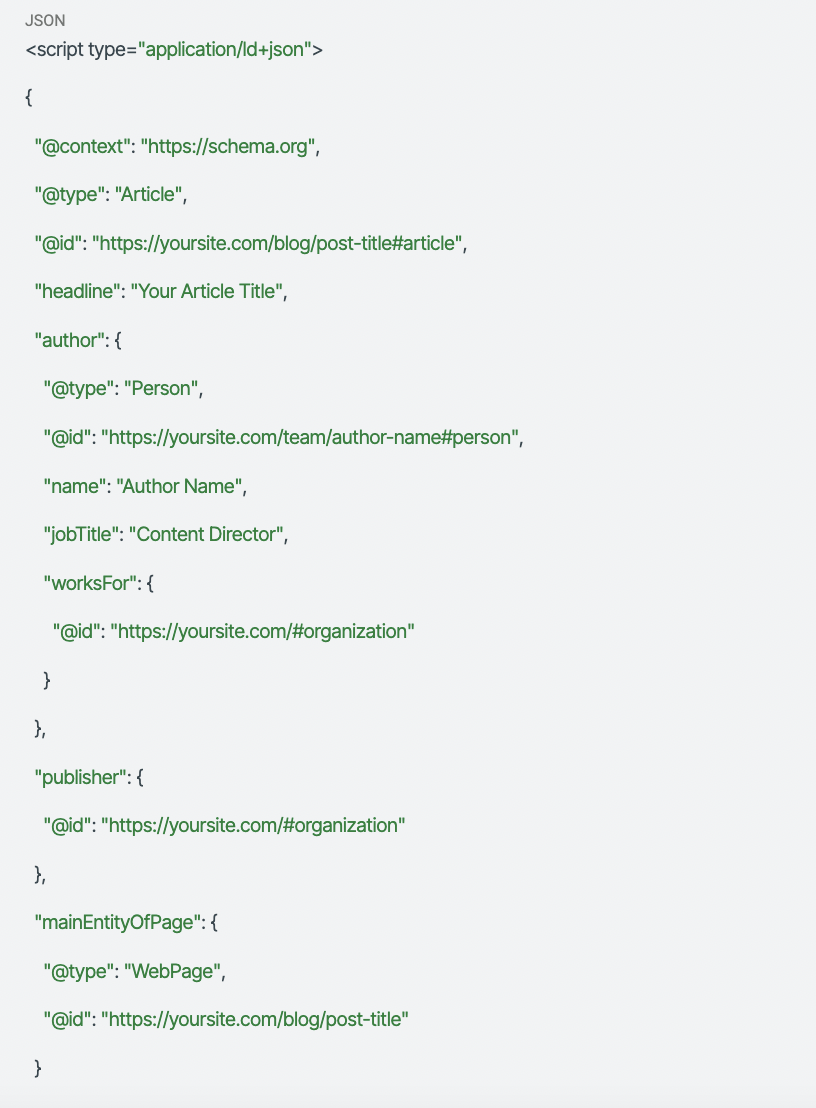
Notice the @id properties? These connect your article schema to person schema and organization markup—building those knowledge graphs we discussed earlier.
How to Implement Schema Markup on Your Website
Once you’ve created your schema markup, you need to add it to your web pages correctly.
Where to Place Schema Code
Option 1: In the <head> section (Ideal)
Most reliable placement. Search engines always check the <head> for structured data items.
Option 2: End of <body> section (Also fine)
Works well but can cause slight delays in discovery if pages load slowly.
Option 3: Google Tag Manager (Conditional)
Useful for managing schema across multiple pages, but Google needs to render JavaScript, which can delay indexing. Use this only if you’re comfortable with GTM and understand the trade-offs.
Sitewide vs Page-Specific Schema
Some schema types should appear on every page (organization schema, website schema), while others are page-specific (product schema, recipe schema, review snippets).
Use templates for sitewide schema:
- Organization markup with your logo, contact details, and social profiles
- Website schema with SearchAction for site search functionality
- BreadcrumbList for navigation structure
Use custom schema for specific content:
- Article schema on every blog post with dynamic author and date fields
- Product schema on ecommerce websites with live pricing and availability
- Local business schema on location pages with unique addresses and hours
Most content management systems let you auto-populate schema fields using page data. For example, WordPress can automatically fill datePublished using the post date and author.name using the post author.
How to Validate, Test & Debug Schema Markup
Adding schema markup is only half the battle. You need to validate it’s implemented correctly and monitor for schema markup issues over time.
Step 1: Check Syntax with Schema.org Validator
Go to Schema.org Validator and paste your URL or code snippet. This catches:
- Missing commas or brackets in JSON-LD code
- Invalid properties for your chosen schema type
- Broken relationships between entities
Fix these errors before testing for rich results eligibility.
Step 2: Test for Rich Results Eligibility
Use Google Rich Results Test to see if your structured data markup qualifies for enhanced display.
You’ll see one of three outcomes:
- ✅ Valid and eligible — Your markup meets requirements for rich snippets
- ⚠️ Valid but warnings — Schema works but could be improved
- ❌ Errors — Schema markup issues prevent rich results
Important: “Valid” doesn’t guarantee rich results will appear. Google chooses when to show enhanced displays based on query intent and content quality.
Step 3: Verify Entity Connections
Tools like Classy Schema visualize how your structured data connects. Check for:
- Orphaned entities — Schema items that aren’t linked to anything
- Broken @id references — Links to non-existent entities
- Missing relationships — Author not connected to Organization, Product not connected to Offer
Connected schema tells search engines how your content fits into a broader knowledge graph, which improves context understanding.
Step 4: Monitor in Google Search Console
After implementing schema markup, monitor performance in Google Search Console under Enhancements:
- Rich results reports — Shows which pages have valid structured data
- Error tracking — Alerts you when schema markup issues arise
- Performance data — Track impressions and clicks for pages with rich snippets
Set up weekly checks to ensure product prices stay current, event dates remain accurate, and news articles don’t show outdated publish dates.
Advanced Schema Strategies for Competitive Advantage
Ready to go beyond basics? These advanced techniques separate average sites from SEO leaders.
Building E-E-A-T Authority Through Connected Schema
Google’s E-E-A-T guidelines (Experience, Expertise, Authoritativeness, Trustworthiness) aren’t just for human readers. Schema markup can signal credibility through entity relationships:
Basic approach:
Add person schema with author name and description.
Advanced approach:
Connect author → credentials → educational background → published works → organization → industry affiliations → verified social profiles using nested schema and sameAs properties.
When AI models trace these connections, they build confidence in your content’s credibility—increasing citation likelihood in AI Overviews and generative search results.
Schema for Multi-Surface Search
Your content doesn’t just appear in Google search anymore. It shows up in:
- AI chatbot responses (ChatGPT, Claude, Perplexity)
- Voice assistants (Alexa, Google Assistant, Siri)
- Visual search (Google Lens, Pinterest Lens)
- Social platforms (LinkedIn, X/Twitter previews)
Structured data helps all these systems understand your page content accurately. For example, ImageObject schema with proper contentUrl and caption properties makes your images more discoverable in visual search. VideoObject schema with transcript and uploadDate helps voice systems pull accurate information.
Implementing Speakable Schema for Voice
While still experimental, Speakable schema identifies sections of your content ideal for voice responses. Add this to your article schema:
“speakable”: {
“@type”: “SpeakableSpecification”,
“cssSelector”: [“.intro”, “.summary”]
}
This tells voice assistants which parts of your article make good spoken answers—typically short, factual paragraphs that answer specific questions.
Common Schema Markup Mistakes (and How to Fix Them)
Even experienced developers make these errors when adding schema markup:
❌ Marking up invisible content
Don’t add review schema for reviews that don’t exist on the page. Google will penalize you for misleading structured data.
❌ Using multiple plugins that create conflicting schema
Check your source code—if you see duplicate organization markup or overlapping article schema from different WordPress plugins, disable one.
❌ Forgetting to update time-sensitive schema
Event dates, product prices, business hours, and offer expirations need regular updates. Set reminders to keep relevant schema current.
❌ Breaking @id connections when moving content
If you change URLs, update all @id references in your entire website’s schema to maintain entity relationships.
❌ Overusing FAQ schema
Google penalized sites that added FAQ schema to every page regardless of whether FAQs existed. Only implement FAQPage schema on actual FAQ content.
✅ Fix: Audit your schema quarterly, validate with Google’s testing tools, and remove any structured data that doesn’t match page content.
Why Schema Markup Is No Longer Optional in 2025
We’ve reached a tipping point. Schema markup has evolved from an SEO nice-to-have into a fundamental requirement for digital visibility. Here’s why:
Search engines rely on structured data to understand ambiguous content. Natural language processing is powerful, but explicit entity relationships eliminate guesswork and improve indexing accuracy.
AI systems need context to verify information and build citations. When ChatGPT or Perplexity pulls data from your site, connected schema markup helps them trace credibility and attribute sources correctly.
Users expect rich results. Star ratings, FAQs, prices, and images in search results aren’t novelties anymore—they’re the baseline. Sites without schema markup look outdated and get fewer clicks.
Voice search demands precision. When someone asks Alexa for business hours or recipe instructions, the system needs structured data to deliver confident answers.
According to Merkle’s digital marketing research, only 30% of websites implement any form of schema markup. That means implementing schema markup correctly gives you an immediate competitive advantage over two-thirds of the web.