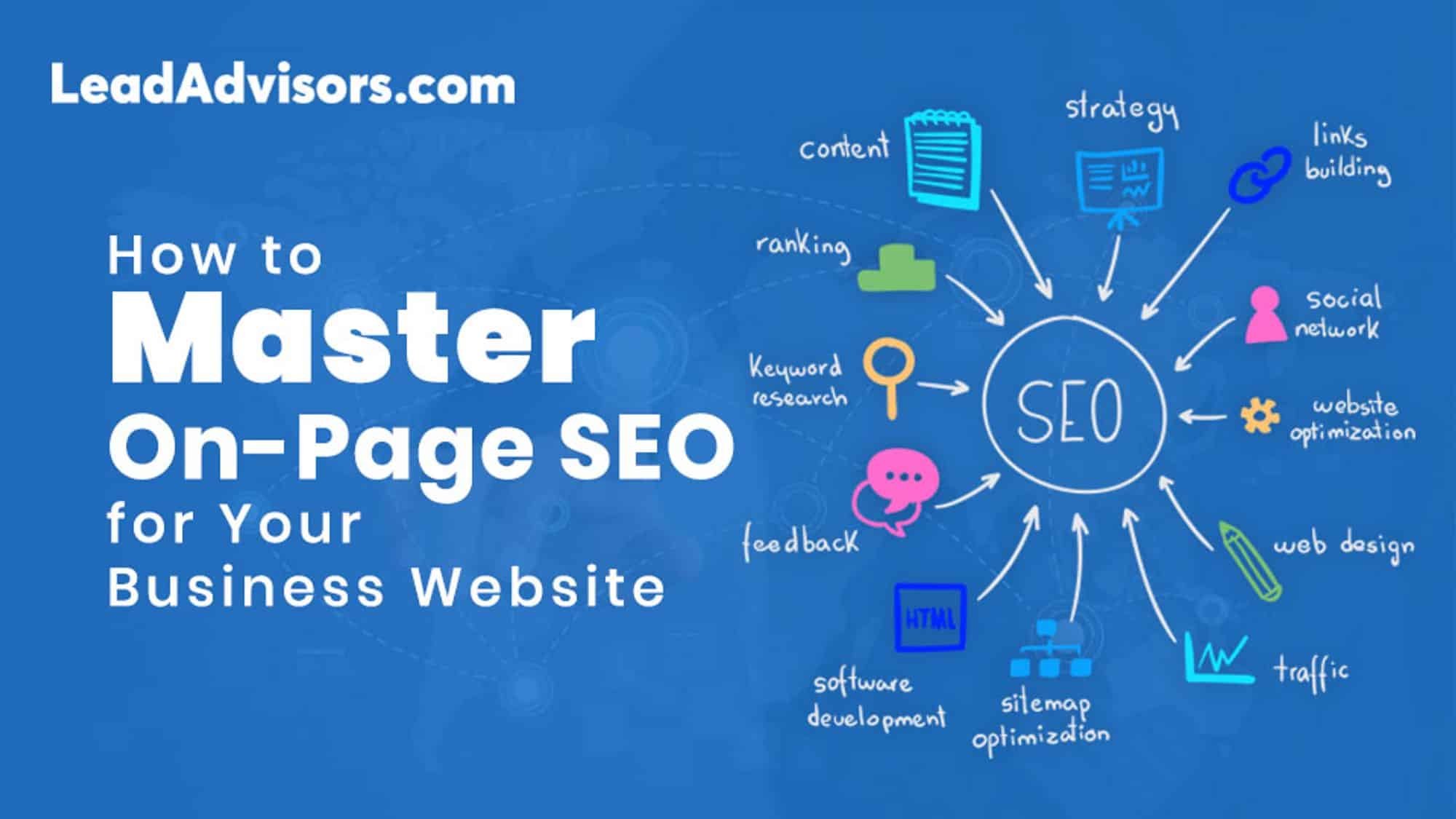
On-page SEO is essentially the technique of tweaking your web page content to get a better position in SERPs and thus drive more targeted traffic. Simply put, it’s making sure that your content, meta tags, links, and various technical aspects perfectly match not only the users’ queries but also the standards of Google’s E-E-A-T (Experience, Expertise, Authoritativeness, and Trustworthiness) standards
Isn’t your company website showing up in search results? I understand the feeling because I have been in that spot as well. It’s such a waste of time and energy, isn’t it? You don’t have to be some kind of tech wizard to sort that out; all that is required is to get the hang of the organic essentials.
Imagine your website as your shop in a virtual world. The essence of on-page SEO is making a neat and tidy arrangement of the shop so that the Google search engine can easily locate it, and your customers have a pleasant time shopping there.
In this guide, I’ll show you the exact strategies you need to optimize your pages, turn “what is SEO” into a growth engine for your brand, and build an online presence that actually lasts.
Pro Tip: Don’t write for bots. If you focus on user experience basics—making your page fast and helpful—the rankings will follow.


Why is On-Page SEO Important?
Think of on-page SEO as the “translator” between your business and the search engine. You might have the best seo services in the world, but if your website doesn’t speak Google’s language, you’re essentially invisible.
When you optimize your pages, you’re doing two things:
- Helping the bots: You’re giving the Google search engine clear signals about your page’s meta meaning and intent.
- Helping your customers: You’re improving user experience basics so people stay on your site longer.
If you don’t have a strong on-page SEO base, your good marketing knowledge won’t be able to pull your rankings out of the hole. Think of it as the difference between a store with a “Closed” sign and one that welcomes everyone in.
The 5 Elements You Need to Optimize Today
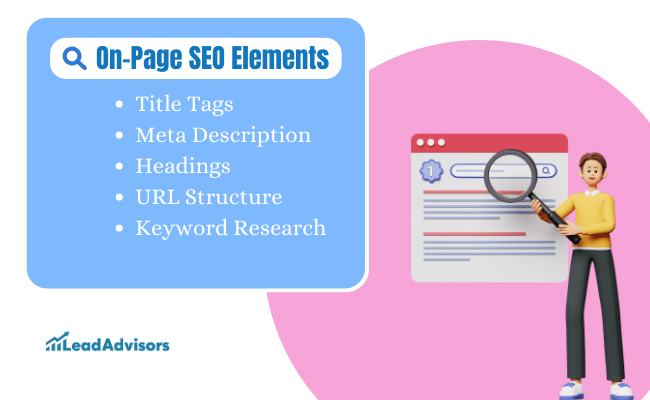
If you want to generate Google traffic to your site, there are five key areas that you must know inside and out:
- Title Tags: This is your digital billboard. Run a catchy line, include your main keywords, but keep it within 60 characters so it doesn’t get cut off.
- Meta Descriptions: It’s your 160-character elevator pitch. Although it does not directly impact your “rank,” a wonderful one will increase your clicksand more clicks tell Google you’re the real deal.
- Header Hierarchy (H1, H2, H3): Don’t just highlight the text; use headers to make a map. The algorithm standard for headers is a system that helps both humans and bots quickly read your SEO website.
- Clean URL Structures: Avoid chaotic and confusing parameters that don’t make sense to a person. As an example, rather than site.com/p=81, try site.com/seo, strategy. It looks more trustworthy.
- Strategic Keywords: Figure out what your potential clients are typing with the help of SEO tools. Then, simply sprinkle those words in your paragraphs and the alt text of images.
Key Takeaway: > Search engine optimization is not about “fooling” the system. It is about being the most organized and helpful answer to a question posed by a user.
The CTR Boost
I once helped a local SEO agency that had amazing content but dull titles. We didn’t change a single word of their actual blogs; we just rewrote their title tags and meta descriptions to be more human. By the next month, their organic traffic was twice as much simply because more people were enticed to click. So, that is the power of seo optimization you can control!
Crafting SEO-Friendly Content

Content is not only “king” in on-page SEO; it is the whole kingdom. Even if you have the most excellent technical SEO in the world, if your text is dull or not helpful, your visitors will leave quicker than a Google dice roll.
To succeed at SEO marketing, you have to give what we refer to as “Information Gain. ” This implies that you give your reader something that he/she can’t get from any other source. Regardless of whether you are providing search engine optimization services or offering a physical product, your content must demonstrate that you are an expert.
The Foundation: Keywords and Intent
Before you begin writing, it is essential to have a plan for SEO.
One of the major factors of successful optimization is knowing search intent. Try to figure out what kind of content will most satisfy the user’s need, e.g., are they after a “how-to” guide, or maybe they are looking for seo services near me?
Once you have your main words, mix them with the text as naturally as possible. The times when “keyword stuffing” was a good tactic are over; the standard algorithm is now smart enough to recognize synonyms and context.
How to Captivate the Audience with On-Page SEO
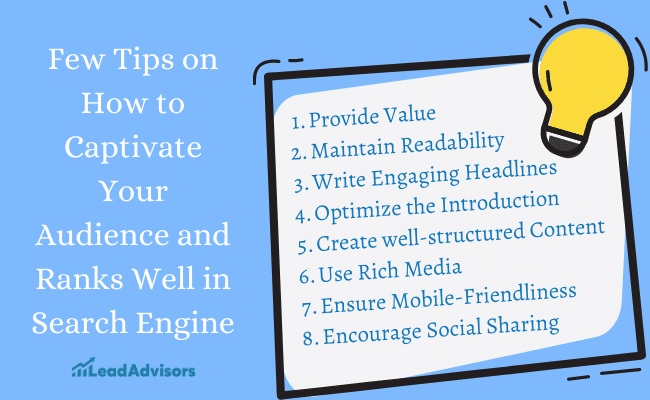
If you wonder how to enhance your management of online presence, here are some easy steps for you to follow:
- Provide Real Value: Be original and share a personal experience or a unique everyday life hack that you have learned.
- Write for “Skimmers”: People mostly browse on their phones (make sure your site is mobile-friendly! ). Keep sentences short, use bullet points, and have clear subheadings.
- Hook Them Early: Tell the search engine what the page is about by using your main keyword in the first paragraph.
- Use Rich Media: A video or a useful infographic can greatly increase your “dwell time,” one of the biggest ranking factors.
- Social Proof: Get your SEO website content readers to share it. Although social shares are not a direct ranking factor, the traffic they bring helps build your brand’s authority.
The “Read Aloud” Test
Whenever I’m writing for an SEO company, I use a simple trick: I read the content out loud. If it sounds robotic or forced because I tried to fit in too many keywords, I delete it. In my experience, content that flows naturally always performs better in the long run than content that tries to “game” the Google search engine.
Quick Takeaway: > Great SEO digital marketing is just good communication. If you help the user solve a problem, Google will eventually find a way to put you in front of them.
Mastering Your “Digital Billboard”: Titles and Meta Descriptions

If your SEO website were a book, the title tag would be the title on the spine, and the meta description would be the blurb on the back cover. These are the first things anyone notices on the Google search engine, and they are your biggest “click triggers”.
Think of these as your chance to be unique in a land filled with markets. By optimizing these elements, you are not just making a search engine happy; you are convincing a human that you are the one who has the answer.
Best Practices for Your “First Impression”
Best practices for your “first impression” On-page SEO will be really effective if you always remember these tips:
- Nail the Length: It’s best to keep your title tags around 50-60 characters and descriptions under 160.
- Front-load Your Keywords: Put your main keywords at the beginning of the title. This makes it easier both for the user and the standard algorithm to understand your meta meaning from the very first glance.
- Be the Better Option: See what your competitors are saying. If they all say “SEO Services,” you should say “Expert SEO Services to Triple Your Traffic.” Be descriptive and compelling.
- Skip the Stuffing: You don’t have to say “search engine optimization” five times. Use that space to emphasize a benefit or a “step of 80” level insight.
The CTR Secret
I have witnessed a majority of business owners fixating on getting the #1 spot; however, here is the secret that I reveal: I was a local SEO agency partner that was at #3 and was not moving. Just by tweaking their meta description to entail a “Free Consultation” offer, their click-through rate (CTR) went through the roof. In fact, they remained at #3 but still outperformed #1 in terms of traffic!
Did You Know? A study by Moz showed that a well-optimized title tag can impact your clicks by over 20%. While meta descriptions don’t technically change your rank, they are your best SEO tool for “selling” the click.
Organizing Your “Digital House”: Structure and Navigation

Have you ever entered a store that looked like everything was just thrown into random bins? You most likely walked out right away. Your SEO website is no different. If your user experience basics are all over the place, people will leave your site, and Google will see that.
A clear, well-thought-out structure is a huge part of on-page SEO. It allows the Google search engine to crawl your website without any hindrance; in other words, it can locate, index, and rank your content easily without getting stuck in a world of broken links.
How to Build a Site That Just “Works”
If you’re still figuring out how to make a website or if you’re even in the process of working with an seo company, here are the tips I will offer you to keep your website structure clean:
- Keep URLs Simple: Don’t let your URLs be a bunch of random numbers. Use a regular algorithm: yoursite.com/seo, strategy will be far better than yoursite.com/p=81.
- Create a Logical Hierarchy: Use H1, H2, and H3 tags to compose a map. Imagine it as a book: The H1 is the title, H2s are the chapters, and H3s are the sub-chapters.
- Use Breadcrumbs: These are those little “Home > Services > SEO Services” links that appear at the top of a page. They assist users in navigating back and also let Google know how your pages are interconnected.
- Master Internal Linking: When you create something new, link it to your other pages related to the topic. It’s like one page giving a “recommendation” to another page, which helps to build up your organic foundations.
- Submit a Sitemap: This is essentially a “cheat sheet” that you provide to the search engine so that it knows which pages to find.
The “Three-Click” Rule
I’m always telling my friends: the most essential content on your site shouldn’t be located beyond three clicks from your homepage. One time, I worked with a local SEO agency, and their best case studies were so buried in the site structure that they were like five clicks away. We brought them up in the main navigation, and not only did their rankings improve, but their leads doubled as a result of people being able to find them!
Key Takeaway: The clean site is a win-win. It is easier for the regular algorithm to index you and for your customers to buy from you. That’s the essence of online presence management.
The Technical “Gears”: Speed, Mobile, and Schema
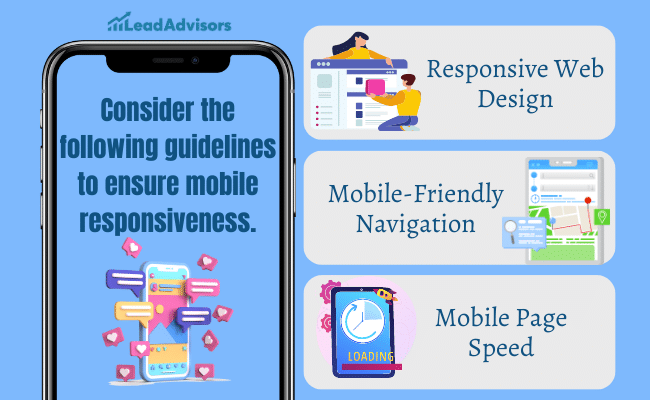
Look, I realize the term “Technical SEO” probably makes you think you have to be a computer genius, but it’s actually more about not making your website visitors angry. If your site is sluggish or you see it as a phone broken, Google’s core algorithm will punish you regardless of the quality of your content.
Consider technical optimization as the motor of your vehicle. You might have a gorgeous exterior (your design), but if the engine doesn’t start, you won’t be able to go anywhere.
1. Speed Up to Scale Up
In the realm of search engine marketing, speed holds a significant ranking factor. A slow site not only ruins your user experience basics but can also harm your ranking. Here is a fix for that:
- Compress Your Images: Oversized files are the top reason why websites get slow. Use SEO tools to reduce them before you upload.
- Enable Caching: Enabling browser caching means your site “remembers” a visitor who returns, so it doesn’t have to reload everything from scratch.
- Clean Up Code: “Minifying” your CSS and Script files simply means taking out the spaces that bots do not need to read. It’s a small change, but it has a significant impact.
2. Mobile-First (No Exceptions)
The majority of people will discover your SEO website via a mobile phone when they are mobile. If people have to “pinch and zoom” to read your text, you have lost them already.
- Responsive Design: Your site needs to be able to adjust automatically if someone is using an iPhone, a tablet, or a desktop.
- Thumb-Friendly Menus: Make sure that your buttons are easily tappable. Your online presence management will be negatively impacted if your navigation is too small.
3. Schema: Talking Directly to the Bots
Schema markup is like giving Google a “cheat sheet” for your page. It helps you show up in those cool “Rich Snippets” (like star ratings or recipe times) in Google search engine results.
The “Factor of 70” Trap
I once collaborated with a small local SEO agency that was clueless about the reasons their rankings were frozen. We conducted a speed test, and their score was a “factor of 70,” not bad, but definitely not good. Just by turning on a Content Delivery Network (CDN) and compressing their code, we took their score to a factor of 90. Their rankings rose by two spots within a week simply because the website was perceived as “faster” by Google.
Pro Tip: Don’t make a guess. Leverage Google Search Console to verify your “Core Web Vitals. ” It’ll provide you with the exact information on which pages are too slow or not mobile-friendly.
Visual SEO: Making Your Images Work for You

Everybody knows the saying” a picture is worth a thousand words,” but in on-page SEO, a picture can also be worth a thousand clicks. If you simply stick a photo on your SEO website randomly, you will miss out on the large traffic chunk coming from Google Images.
It’s not only about making your multimedia attractive when you optimize it; you have to think about the accessibility and speed as well. When your pictures are too big, your page loading time will go down.
How to Optimize Your Media Like a Pro
If you really want to get the most out of your media, use the following techniques:
- Descriptive File Names: Rename your file before uploading. Use local-seo-services-tips.jpg instead of IMG_1234.jpg. This instructs Google to understand what the picture is about.
- Master the Alt Text: Alt tags (or alternative text) represent the text content that will be displayed if an image is not loaded. Apart from that, they are also very important for screen readers. Do not simply fill them with keywords; write a description of what is shown in the image to help the person who cannot see it.
- Watch Your File Size: You know, I’m often asked, “What’s mb in text?” In fact, a Megabyte (MB) in terms of web speed is quite a big one! The size of your images should be in the “Kilobyte” (KB) scale. Take advantage of SEO tools like TinyPNG or Squoosh to minimize your files before making them available.
- Captions & Context: Captions aren’t only for credits. People read captions 300% more than the main text! Use them to provide additional information that will hold the attention of your readers.
The “Hidden” Traffic Source
I had a client selling custom furniture with whom I worked with once worked. Their fabulous photos were accompanied by zero optimization. We took a day to change their file names and add a descriptive alt text. Two months later, they were getting a 15% increase in their total leads coming only from those who found their pictures via Google Image search. Don’t ever overlook the power of a properly named image!
Key Takeaway: > When you make your images easy for Google to “read,” you’re not just helping your SEO optimization, making your site more accessible and faster for everyone.